
Ghost’s membership system is genuinely good. Tiers, gated posts, a member portal, newsletters tied to access levels. It is a complete product and it is free.
It also asks for Stripe and stops there. No dropdown, no second option, no plugin marketplace. If Stripe does not operate in your country, or you would rather not be the merchant of record for tax in thirty jurisdictions, the feature simply ends.
This is the map of what you can do instead. Four routes, compared honestly, including the one I sell.
Why Ghost only offers Stripe
Ghost did not build a payment abstraction and implement Stripe first. It built its membership billing directly on Stripe’s API. The subscriptions, the customer portal, the checkout: all Stripe objects wearing Ghost’s styling.
That was a fast and sensible decision for a small team, and it is part of why Ghost memberships work as well as they do. It is also why adding a second provider is not a weekend’s work for them.
The consequence for you is narrow and specific. Ghost does not need Stripe to hold members. It needs Stripe to sell to them. Everything after the payment, the member record, the tier, the gate on the post, runs through Ghost’s Admin API and has no opinion about where the money came from.
That gap is the whole opportunity.
Route one: a Stripe account registered somewhere else
Widely suggested in forums, and the fastest way to lose access to your own revenue.
Stripe requires the business to be established in the country of the account. A company address you do not operate from does not satisfy that, and the pattern it creates, foreign payouts against a domestic customer base, is precisely what account reviews are built to catch.
The failure mode is not a polite email asking for clarification. It is a freeze while you are holding other people’s subscription money, and a support queue that has heard the explanation before.
If the revenue matters to you, do not build on this.
Route two: automation glue
Zapier, Make, or n8n listening to a payment provider and calling Ghost’s Admin API to create the member.
This genuinely works, and for one case it is the right answer: a single one-off purchase granting permanent access. Somebody pays once for a course or an archive, the automation fires, Ghost gets a member, nobody ever changes their mind.
For a subscription it falls apart, and it falls apart late.
A subscription is not one event. It is a stream: created, renewed, payment failed, retried, recovered, cancelled at period end, expired. Each needs a different response in Ghost, and you are now maintaining a billing state machine inside a tool built for straight lines. Most people wire up the grant and forget the revoke, then find out six months later that they have members who stopped paying and never lost access.
The other thing nobody plans for is retries. Providers resend webhooks when they do not get a fast answer, and without idempotency the same purchase gets applied twice.
I wrote both up in detail: the Zapier version and the n8n version. Neither article tells you not to do it. They tell you what you are signing up for.
Route three: leave Ghost
Substack, Beehiiv, Patreon, Memberful. All of them will happily take your payments.
Substack and Beehiiv are also built on Stripe, so if Stripe is your constraint, moving does not remove it. Patreon and Memberful have their own reach and their own cut.
The real cost here is not the fee. It is giving up the thing that made Ghost worth choosing: your own domain, your own theme, your own list, and content that belongs to you rather than living inside somebody else’s feed.
Worth considering if you were unsure about Ghost anyway. A strange thing to do because of a billing limitation.
Route four: keep Ghost, change the provider
Take the money through a provider that operates where you do, and put something in between that translates the payment into a Ghost membership.
The providers exist, and several are better suited to a small publisher than Stripe is:
| Provider | Merchant of record | Notable for |
|---|---|---|
| Polar | Yes | Developer-friendly, clean API, EU VAT handled |
| Paddle | Yes | Long established, broad tax coverage |
| Lemon Squeezy | Yes | Simple store model, quick to start |
| Creem | Yes | Merchant-of-record billing, test mode without extra setup |
| Gumroad | Yes | Lowest barrier to a first sale |
| Ko-fi | No | Tips and memberships, minimal setup |
| PayPal | No | Widest country coverage for payouts |
| Patreon | No | Useful when the audience is already there |
That middle column matters more than people expect. It decides whether you or the provider is legally the seller, and therefore who files VAT in every country your readers live in. If the phrase is new, I explain it properly here.
The missing piece has always been the translation step. Ghost cannot listen to any of these providers, and none of them know what a Ghost tier is.
That is what PayGlue does: it receives the provider’s webhook, verifies the signature, and calls Ghost’s Admin API to grant or revoke the membership. About ten minutes of setup per provider, and no code on your site.
What you actually have to decide
Not “which provider is best”. Three narrower questions, in this order.
Can it pay you? Payout availability in your specific country. This eliminates most of the list for most people outside the US and EU, and it is the only question with a binary answer. Check it before you look at a single feature.
Do you want to file VAT? If not, you need a merchant of record: Polar, Paddle, Lemon Squeezy, Creem or Gumroad from the table above. The rest leave the obligation with you.
One-off or recurring? Ko-fi and Gumroad are excellent for one-off payments and tips, and awkward for subscriptions. Polar, Paddle, Lemon Squeezy and PayPal handle recurring properly. Ko-fi has one limitation worth knowing before you commit: it never sends a webhook when a membership ends, so cancellations have to be handled by hand.
Everything else, dashboard quality, fee percentages, how the checkout looks, is a tiebreaker. Answer those three and you are usually down to two candidates.
Setting it up
The shape is the same for every provider.
Connect Ghost first. In Ghost, go to Settings, then Integrations, then Add custom integration. Ghost gives you an Admin API key. That key can create and modify members, so treat it like a password.
Then connect the provider: paste the webhook URL from your connection page into the provider’s webhook settings, select the events, and paste the provider’s signing secret back.
Then map one product to one Ghost tier and buy it yourself. A test purchase that costs you fifty cents is worth more than an hour of reading logs.
The per-provider guides go through it step by step:
The part everyone trips over
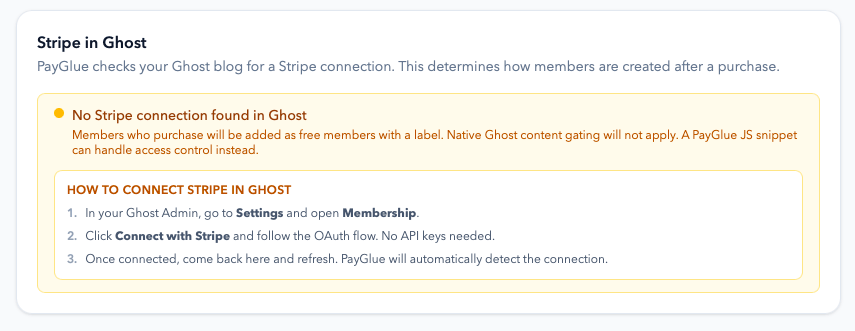
Ghost still wants a Stripe account connected before it will show you the membership settings at all, even when Stripe will never process a payment for you.
This confuses people badly, because it looks like the workaround failed. It did not, and what happens next depends on whether a Stripe account is available to you at all. The two cases behave differently, and most writing on this subject only describes the first one.
If you can have a Stripe account
Connect it and leave it idle. Ghost is satisfied, and your real money moves through the provider you chose.
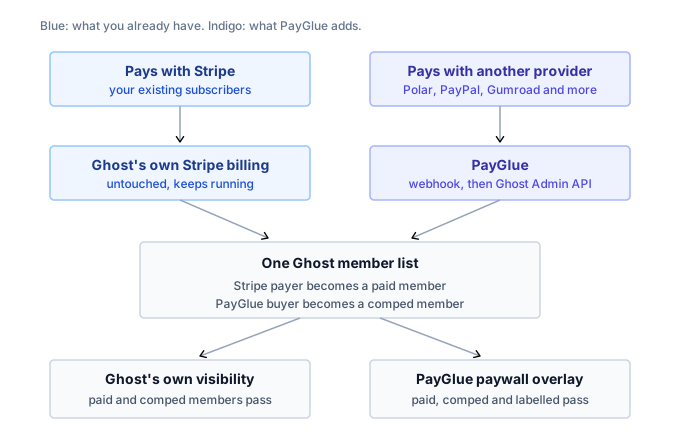
Members created through that provider are marked comped in Ghost, which is Ghost’s own word for a complimentary paid membership. They are paid members as far as Ghost is concerned, so Ghost’s native gating, tiers and portal all behave normally. Nothing about your existing Stripe subscribers changes, and the two paths never fight over the same person.
Keeping Stripe and adding to it
Everything above assumes Stripe is a problem you are working around. For a lot of publishers it is not: it works, the subscribers renew, and the question is only how to sell one more thing.
That is the same setup rather than a different one. Stripe keeps billing the people it already bills, the second provider handles the new sales, and Ghost ends up with one member list built from both. There is no cutover date and nothing to migrate, because Ghost memberships were never tied to a provider in the first place.
Three things follow from running both, and none of them need work from you:
- A person is one Ghost member, found by email address. Somebody who subscribes on Stripe and later buys through the other provider is updated rather than duplicated, and neither provider bills for the other’s customers.
- Cancellation happens where the purchase did. A Stripe subscriber uses Ghost’s portal; the other provider’s buyer cancels at that provider. The member’s own record says which is which.
- Map the second provider’s products to the tiers your Stripe plans already use, and a reader gets the same access whichever button they clicked.
The one thing worth checking after any change is your access rule. A gate that only recognises the members you created will turn away genuine Stripe subscribers, who carry no PayGlue label because PayGlue never touched them. The PayGlue paywall covers Ghost’s own paid status, the comped flag and the label; a hand-built one has to do the same.
The full article on running Stripe and PayGlue together goes through the mechanism, and there is a separate one on the four things to watch day to day.
If Stripe is not available to you
The advice to connect an idle account is useless when Stripe does not operate where you live, which is exactly the situation most people reading this are in. Opening one somewhere else is the route that gets accounts frozen. Why.
So the honest version: with no Stripe connected, Ghost will not let anything be marked as a paid member, comped included. That is Ghost’s rule and nothing on PayGlue’s side overrides it.
What happens instead is that the member is created as a free member carrying a label that records the access, and the paywall script on your site checks for that label rather than relying on Ghost’s own gating. The reader buys, gets access, and loses it on cancellation, the same as anyone else. What differs is which piece of software decides whether a given post is open to them.
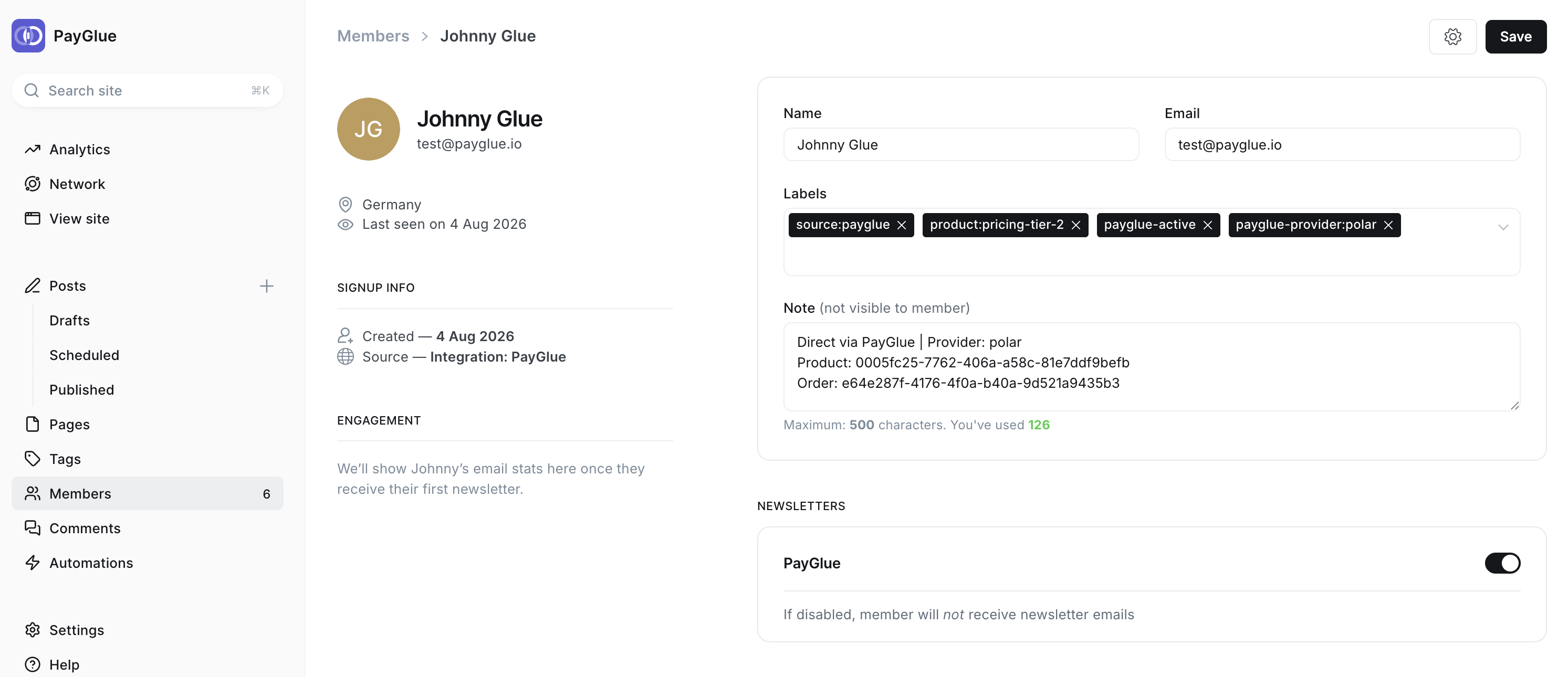
Two things follow from that, and both are worth knowing before you build on it.
The script is one script. It goes into Ghost under Settings, then Code Injection, then Site Header, once, and it never changes. The same one powers the paywall overlay, the buy buttons and the pricing table, so this is a single step rather than one per feature. Posts using the overlay also have to keep Ghost’s own visibility set to Public, because a post Ghost has restricted blocks the visitor before the script gets to run.
And the gate is a soft one. It is client-side, so a reader who opens browser developer tools can get at the hidden content without paying. That is a fair trade for posts, archives and community writing. It is the wrong tool for credentials, personal data, or anything where one determined reader getting through would actually matter to you.
In exchange, the whole thing works in a country where Ghost’s membership feature otherwise ends at a button you cannot press.
Switching an existing post onto the overlay
The overlay recognises all three ways a Ghost member can have access: a paid subscription, complimentary status, and the access label. So moving a post from Ghost’s own visibility settings onto the overlay does not cost you your existing subscribers, and there is nothing to prepare.
The side effect in the first case
Ghost sometimes shows a Stripe-flavoured cancellation notice to comped members who never paid through Stripe. Cosmetic, and it will generate support email if you do not know it is coming. One line in your welcome message saying where people actually manage their subscription settles it.
If you take one thing from this
Ghost’s Stripe requirement limits selling, not membership. Once you see that split, the problem stops being “Ghost will not let me” and becomes “what do I put in front of the Admin API”, which has several good answers.
If you sell one thing once, automation glue is cheap and fine. If you sell a subscription, the question is not whether you will build the missing logic, but whether you will notice the day it quietly stops working.
If you want the scale of this rather than the mechanics, I went looking for how many Ghost sites cannot or will not use Stripe. I could not get a clean number, so that article shows the working instead of a headline figure.