
Three times in the past month somebody wrote to me with a pricing question. A founding rate for the first thirty days and a higher price after that, and how to freeze the early price. Whether a yearly plan needs a second product. How a trial shows up. Good questions, carefully asked, and every one of them was a question for the payment provider, sent to me.
I answered them anyway, because I know the providers well enough by now. But the pattern told me something about how PayGlue looks from the outside. It sits in the dashboard next to the word “price”, so people assume it owns the price. It does not, and it never will. This article is the longer version of the answer I keep writing.
The line, in one sentence
Everything that happens before the money moves is the payment provider. Everything that happens after is PayGlue.
That sounds glib, so here is what each side of the line contains.
What a payment provider does
The provider is the company your reader pays. In PayGlue’s case that is one of eight: Polar, Creem, Lemon Squeezy, PayPal, Paddle, Gumroad, Ko-fi or Patreon. It does the whole commercial side:
- The checkout page, the card form, Apple Pay and the rest.
- The product, with its price, its currency and its billing interval. At most providers a monthly plan and a yearly plan are two products, not one product with two prices.
- Trials, discount codes, founding rates, price changes and what happens to existing subscribers when a price changes.
- Renewals, failed payments and the reminder emails that follow them.
- Invoices, VAT and sales tax. Several of these providers are the merchant of record, which means the invoice carries their name and the tax is their problem.
- Refunds and chargebacks.
- The payout to your bank account.
None of this touches PayGlue. If a reader asks why the invoice says Polar, or why the price shown in India differs from the one shown in Germany, the answer lives at the provider.
What PayGlue does
PayGlue starts the moment the provider says “paid”. The provider sends a webhook, a small message that a purchase, a renewal or a cancellation happened. PayGlue reads it, checks the signature, and does the Ghost side:
- Finds the member in your Ghost site by email, or creates one.
- Sets the label that marks what they bought, and the comped status that opens the paid content.
- Removes that access again when the subscription ends or the money is refunded.
- Keeps an event log so you can see every delivery and replay one that failed.
- Renders the pricing table, the buy button and the paywall on your site, and sends the click to the provider’s checkout.
Whose member is it at the end of that chain? Yours, in your Ghost site. I wrote about why that matters in Whose Member Is It?.
The best example I have
The question that made me write this: “PayGlue asks me to enter a yearly price, but I can only pick one product.”
The yearly price in the pricing table editor is a display string. PayGlue prints it on the table. It never charges it. The product behind the button belongs to the provider, and a product at Polar is exactly one price with one billing interval. Polar’s documentation says so in one line: each product has a single pricing model, and instead of bolting variants onto one product you create one product per pricing model.
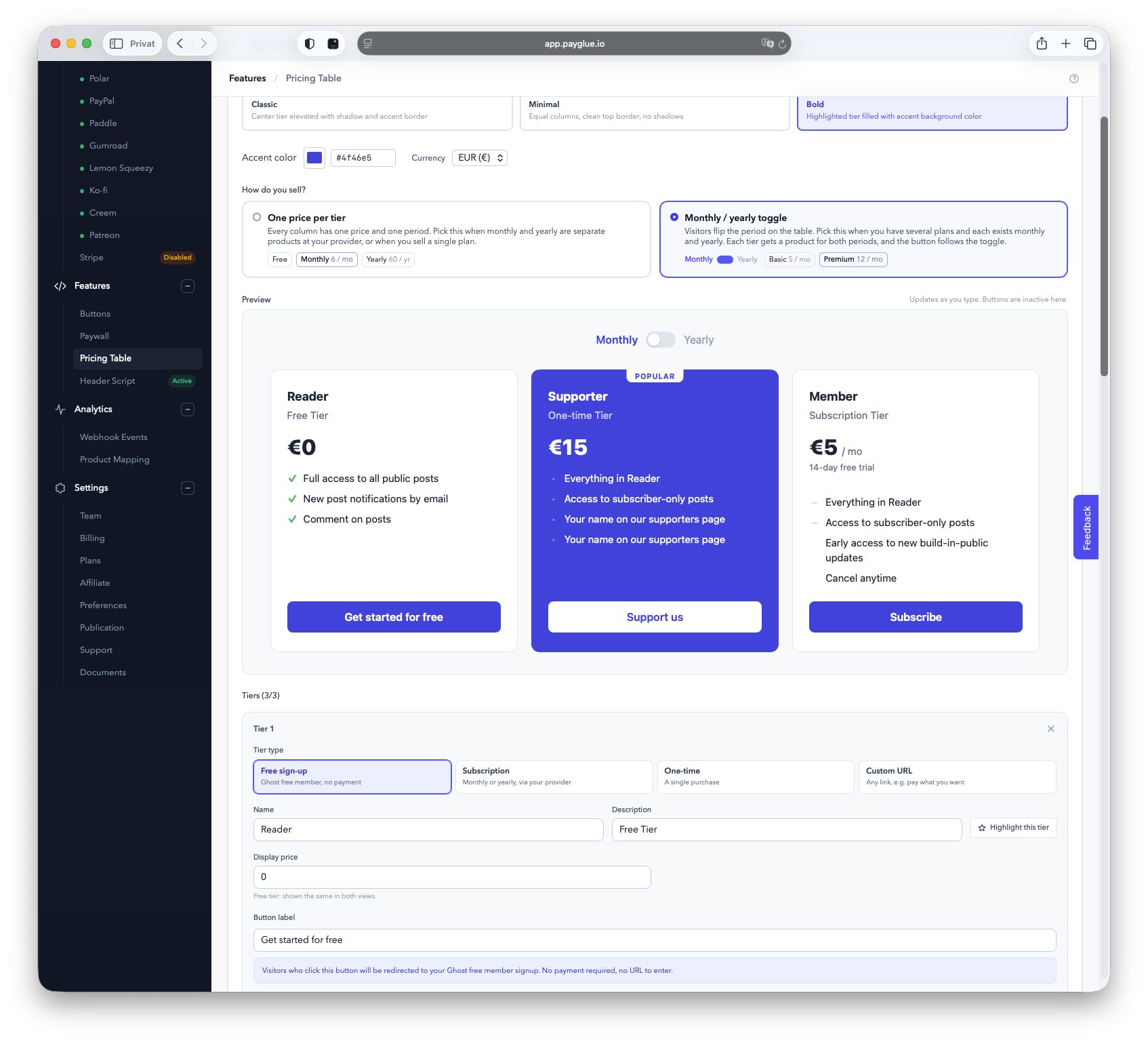
So a table with a monthly/yearly toggle needs two products, one per period. Until this week PayGlue did not let you pick the second one, which was a gap on my side, and the toggle only changed the number on the screen while the button kept opening the monthly checkout. That is fixed: a toggled tier now carries a monthly and a yearly product, and the button follows the toggle. But the reason it works that way is the line above. Prices are the provider’s. PayGlue can only point at them.
A second example from the same week: “The Ghost actions block is missing in my tier.” It appears once a product is selected, because there is nothing to map before that. Everything PayGlue does hangs off a product id from the provider. Without a product there is no webhook to read and no member to create.
Why the line runs there
I could have built the other thing. A billing system with prices, plans and a checkout of my own. Plenty of tools for Ghost went that way, and the ones that did took on the tax and the disputes that come with holding the money.
I did not want that, and I wrote down why when I decided not to connect Mollie. Mollie is a fine payment API, but it hands you the raw pieces and expects you to build the subscription logic yourself. That is a billing system, and a billing system is a different company. PayGlue stays on the Ghost side of the money on purpose. The provider is the merchant. I am the glue.
The upside for you is that you keep the provider’s whole feature set: trials, discount codes, tax handling, invoices, a customer portal, all maintained by a company whose only job that is. The downside is that you have two dashboards, and a price question goes to one of them while a label question goes to the other.
Who answers what
| You want to | Where it lives |
|---|---|
| Change a price, add a yearly plan, set a founding rate | Provider |
| Add a trial or a discount code | Provider |
| See or send an invoice, handle VAT | Provider |
| Refund a purchase | Provider, then PayGlue removes access on the webhook |
| Change what a purchase unlocks in Ghost | PayGlue, product mapping |
| Change the label, the newsletter opt-in, the welcome email | PayGlue, Ghost actions on the mapping |
| Change how the table, button or paywall looks | PayGlue |
| Find out why a member did not get access | PayGlue, event log |
If you are not sure, ask me anyway. I would rather point you to the right page in your provider’s documentation than have you guess. But the answer to a price question will always end at the provider, because that is where the price is.
When something goes wrong
The line also decides who fixes what. A payment that fails on renewal is the provider’s process, and PayGlue reacts to the outcome. Failed Payment vs Cancellation walks through it. A refund is issued at the provider, and PayGlue takes the access back when the webhook arrives. That is in Refunds, Chargebacks and Ghost Access. A member who paid and did not get in is mine to look at first, because the event log shows whether the webhook arrived and what happened to it.
The founding-rate question that started this deserves its own article, because it touches both sides of the line in the right order: set the price at the provider, map the product in PayGlue, switch the table on the day. That one is here.