
Paddle has been doing merchant-of-record billing since long before it was fashionable, and its tax coverage is the broadest on this list. If your readers are spread across a lot of countries, that matters more than the checkout design.
There is one thing about Paddle you should know before you start, because it changes the shape of the setup: Paddle has no checkout links. No URL you can paste into a button. Checkout opens as an overlay on your own page, triggered by JavaScript. That means a small amount of code injection in Ghost, which none of the other providers require.
If that is a dealbreaker, Lemon Squeezy or Polar give you plain links and the same merchant-of-record treatment. If it is not, Paddle is excellent.
What you need first
- A Ghost site you administer
- A Paddle account with at least one product and price
- Admin access to both
Connect Ghost first
In Ghost, open Settings, then Integrations, then Add custom integration. Name it PayGlue.
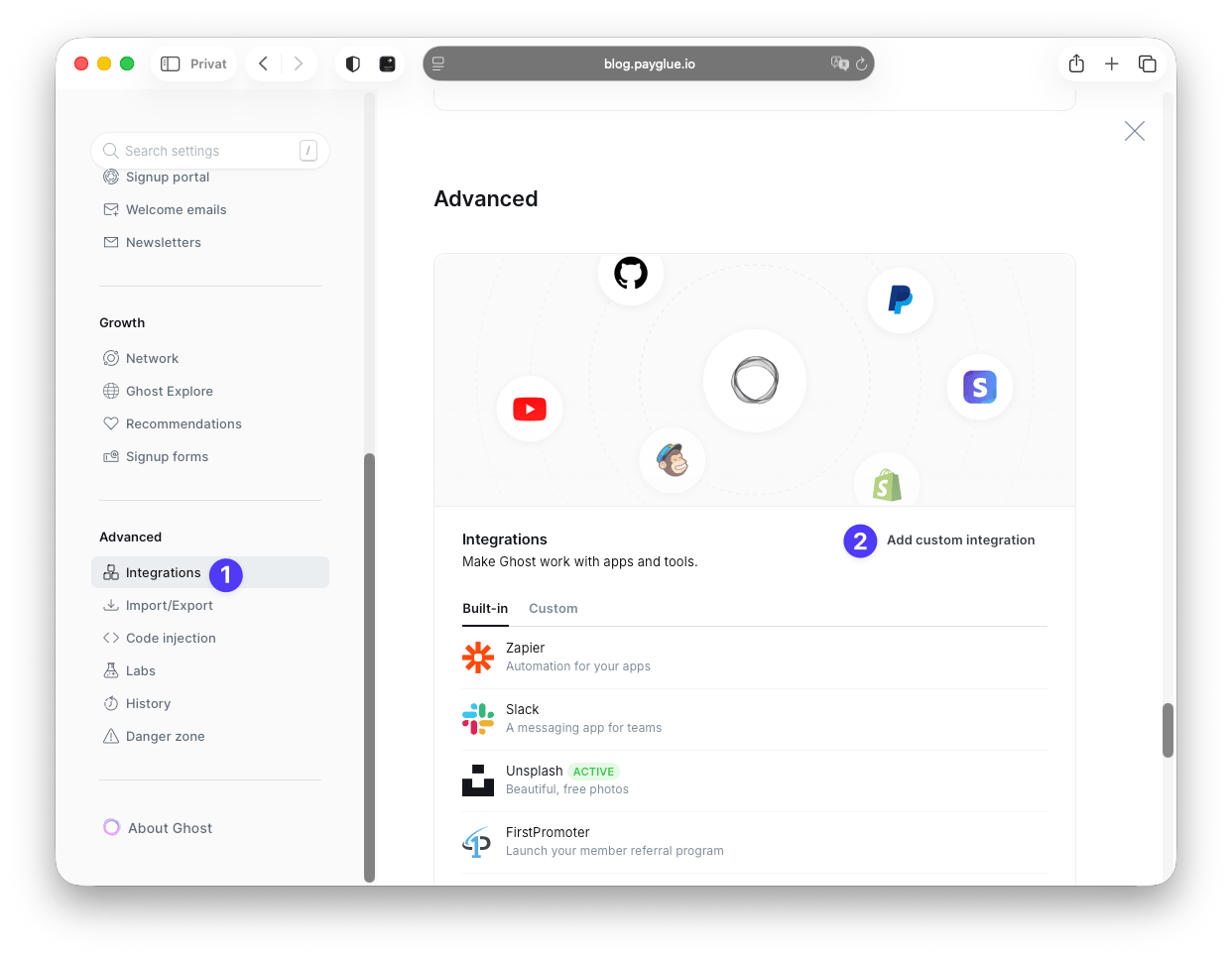
Ghost then shows the keys. The Admin API key is the one that matters here.
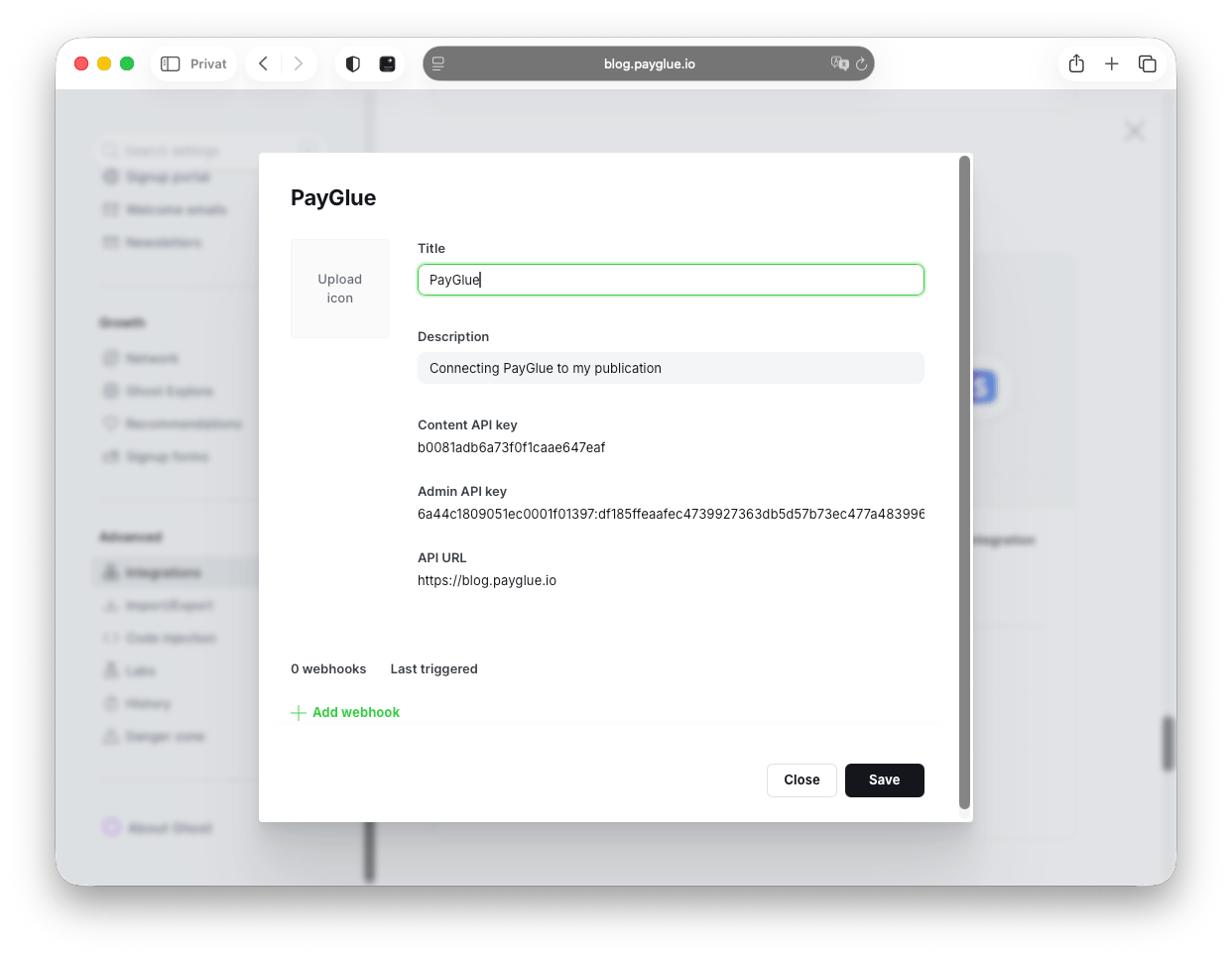
Copy the Admin API key along with your site URL.
That key can create and modify members, so treat it like a password.
Create the API key in Paddle
In Paddle, go to Developer tools, then Authentication. Click Generate API key, name it, and copy it immediately. Paddle shows it once and never again.
The prefix tells you the mode: pdl_live_ for live, pdl_sdbx_ for sandbox. PayGlue reads the mode off that prefix, so there is no separate switch to forget.
Add the notification destination
Paddle calls webhooks “notification destinations”, which is worth knowing before you spend five minutes looking for a Webhooks menu.
Go to Developer tools, then Notifications, then + New destination:
- Type: URL
- URL: the webhook URL from your Paddle connection page, ending in
?tenant=your-slug - Events: all six of
transaction.completed,subscription.activated,subscription.resumed,subscription.canceled,subscription.paused,subscription.past_due
Save it, then open the destination again and copy its secret key. It starts with pdl_ntfset_.
Back in PayGlue, enter the API key and that webhook secret, then run the health check. Green means Paddle accepts the key.
Which events do what
| Paddle event | What happens in Ghost |
|---|---|
transaction.completed |
Membership granted, one-time purchase |
subscription.activated |
Membership granted |
subscription.resumed |
Membership restored |
subscription.canceled |
Membership revoked |
subscription.paused |
Membership revoked |
subscription.past_due |
Membership revoked |
past_due deserves a moment. It fires when a renewal payment fails, and treating it as a revoke is a deliberate choice: somebody whose card bounced is not a paying member until it recovers. When it does, subscription.resumed puts them back. Skip that event and you end up with a quiet population of people reading for free.
Put a checkout on your Ghost site
This is the Paddle-specific part. You need two values first, and they are easy to mix up.
Client-side token. In Paddle, go to Developer tools, then Authentication, then Client-side tokens. It starts with live_ or test_. This one is public and goes in your page.
Price ID. In Paddle, go to Catalog, then Products, open a product and copy the ID of the price you want to sell. It starts with pri_.
Then in Ghost, go to Settings, then Code injection, then Site header:
<script src="https://cdn.paddle.com/paddle/v2/paddle.js"></script>
<script>
  Paddle.Initialize({ token: 'YOUR_CLIENT_TOKEN' });
</script>
Use the client-side token here, not the API key. The API key is secret and must never appear in your site’s HTML, where every visitor can read it.
Then, wherever you want a button, add this via the HTML card in the Ghost editor:
<button onclick="Paddle.Checkout.open({ items: [{ priceId: 'pri_xxxx', quantity: 1 }] })">
  Buy now
</button>
A visitor clicks, the Paddle overlay opens, they pay, Paddle sends the webhook, the Ghost membership appears.
Map the product to a Ghost tier
Open the Buy Button, Paywall or Pricing Table editor, pick your Paddle product, choose the Ghost newsletter and welcome email, and save.
Without a mapping the event arrives, gets verified, and then nothing happens. That is intentional, and it looks exactly like a bug the first time.
Test it in sandbox
Use a sandbox API key (pdl_sdbx_) and a sandbox client-side token (test_). PayGlue picks up sandbox mode from the key prefix.
The part people miss: your sandbox notification destination has to point at the same webhook URL. Sandbox and live are separate configurations in Paddle, and a destination configured only in live means your sandbox purchases go nowhere.
Then clear the test members out of Ghost Admin before you switch to live credentials.
When something does not work
Three failures cover most of it.
Health check fails after saving. You entered the client-side token in the API Key field. The API key starts with pdl_live_ or pdl_sdbx_.
The overlay does not open. Check the browser console. Paddle is not defined means the script is missing from code injection. Invalid token usually means a sandbox token on a live page or the reverse.
Webhook shows as failed. The secret in PayGlue does not match the destination’s secret key in Paddle. They have to be identical.
If an event never appears at all, that is a delivery problem rather than a verification one: check the URL and the slug at the end of it.
One honest caveat about signatures
Paddle’s notification delivery does not currently attach a cryptographic signature. PayGlue stores your webhook secret and will verify the Paddle-Signature header the moment Paddle starts sending one, with no action needed from you.
Until then, the per-organisation webhook URL is doing the work of a shared secret. Practically that is fine, since the URL is not published anywhere. It does mean you should treat that URL as private rather than something to paste into a public support thread.
Is Paddle the right pick
Choose it when tax coverage across many countries is your main problem and a few lines of code injection do not scare you.
Choose something else when you want a link you can paste into an email, or when your Ghost theme makes code injection awkward. The comparison of all the routes is here, and what merchant of record actually means is here.