
Almost everything written about connecting a payment provider to Ghost, including most of this blog, starts from the same assumption: Stripe is not an option for you. Your country is not on the list, your account was closed, the payout currency does not work.
That leaves out a larger group. Stripe works fine for you. You have subscribers on it, they renew every month, nobody is complaining. You just want to sell one more thing, or sell in a way Stripe does not cover, and you have no intention of tearing out something that works.
That is not a migration and it is not a workaround. Running Stripe and a second provider on one Ghost site is a normal configuration, and Ghost is built in a way that allows it.
Why Ghost allows it at all
Ghost memberships are not tied to a payment provider. A Ghost member is an email address with a status, a set of labels and optionally a tier. Stripe is what Ghost offers to create paid members, but it is not what makes them paid once they exist.
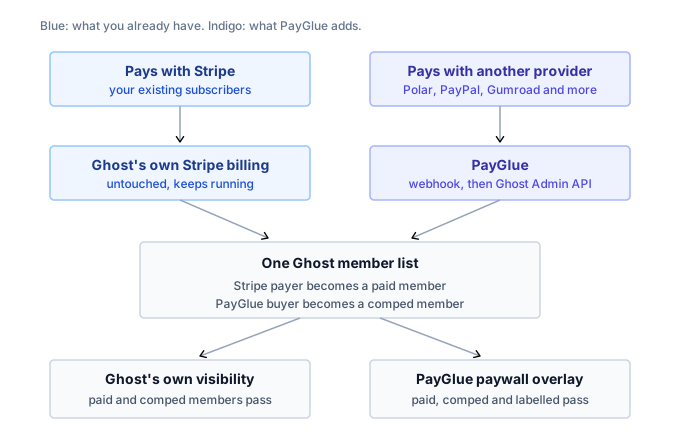
That distinction is the whole thing. Ghost’s own billing writes to the member list. The Admin API also writes to the member list. Neither cares that the other exists.
What changes for your existing subscribers
Nothing. That is not reassurance, it is a description of the mechanism.
Your Stripe subscribers were created by Ghost, bill through Ghost, renew through Ghost and cancel through Ghost’s portal. PayGlue writes new members through a different door and has no reason to open theirs. It does not iterate your member list, it does not rewrite statuses, and it does not know who your Stripe customers are.
The one thing worth knowing is how the access check handles them, because it is the part people get wrong when they build one themselves.
Three kinds of member, one gate
A Ghost site running two providers has members in three different states, and an access check has to recognise all of them.
A Stripe subscriber has status paid and carries no PayGlue label, because PayGlue never touched them. A PayGlue buyer on a site with Stripe connected is marked comped. A PayGlue buyer on a site without Stripe is a free member with a label.
The PayGlue paywall covers all three. If you write your own gate on top of the Ghost Admin API, that is the shape it needs.
Comped, and why your buyers get that flag
Ghost has no way to represent a paid member without a Stripe subscription behind them. There is no status for “this person paid, elsewhere”.
What it does have is comped, its own word for a complimentary paid membership. A comped member is a paid member as far as Ghost is concerned: native gating works, tiers work, the portal shows them as a member. So that is what PayGlue sets.
There is a condition attached, and it is the reason this article splits into two paths. PayGlue asks Ghost whether a Stripe account is connected by reading stripe_connect_account_id from your site settings.
| Your setup | What a PayGlue buyer becomes | What gates the content |
|---|---|---|
| Stripe connected | Comped member | Ghost’s own post visibility, or the overlay |
| No Stripe connected | Free member with a label | The PayGlue paywall overlay |
If you have Stripe connected, your buyers land as comped members and Ghost’s native gating covers them without you doing anything else. If you do not, Ghost’s native gating has nothing to work with, so the overlay does the job instead.
Both paths end with the reader seeing the post. The second one just does more of the work itself.
Where the two paths do touch
Three places, and they are all worth a minute of thought before you launch.
One person, one member. Ghost identifies members by email address. If somebody who already subscribes through Stripe buys again through your other provider, PayGlue finds the existing member and updates it rather than creating a second one. They do not become two people, and they do not get billed twice by anyone, because the two providers have no idea the other exists.
Cancellation is per provider. A Stripe subscriber cancels in Ghost’s portal. A PayGlue buyer cancels wherever they bought. Neither cancellation reaches the other system, which is correct, but it means your support answer depends on where the person came from. The member note PayGlue writes tells you which is which.
Tiers are shared. If you sell the same tier through both, map the other provider’s product to the same Ghost tier your Stripe plan uses. Then a reader gets the same access no matter which button they clicked, and your gating stays one rule instead of two.
When this is the right setup
Two situations come up repeatedly, and neither is a country problem.
You want a merchant of record for part of what you sell. Stripe leaves VAT to you. A merchant of record does not. Selling a one-off ebook or a lifetime plan through Polar or Paddle while your monthly subscriptions stay on Stripe is a reasonable division, and the three of them differ in ways that do not show on their pricing pages.
You want to sell where your audience already is. Ko-fi, Gumroad and Patreon have their own buyers and their own discovery. Selling access there does not require you to move your existing subscribers anywhere.