
Lemon Squeezy is a merchant of record, which means it is legally the seller and it files the VAT. For a small publisher selling into a dozen countries, that is the difference between running a business and running a tax department.
What it does not know is what a Ghost membership is. This guide closes that gap: a completed checkout grants the tier automatically, and a cancellation takes it away again.
Budget about ten minutes. Nothing here needs code on your site.
What you need first
- A Ghost site you administer, self-hosted or Ghost(Pro)
- A Lemon Squeezy account with at least one product or variant
- Admin access to both
How the pieces fit
Three things move between the systems, and it helps to know which is which before you start clicking.
| Step | Happens in | You configure |
|---|---|---|
| Customer pays | Lemon Squeezy | Product and price |
| Event is delivered | Lemon Squeezy to PayGlue | Webhook URL and signing secret |
| Product maps to a tier | PayGlue | Product mapping |
| Access is granted | Ghost | Nothing, it is automatic |
Connect Ghost first
Start here, not with Lemon Squeezy. If nothing can reach Ghost, the rest has nowhere to deliver to.
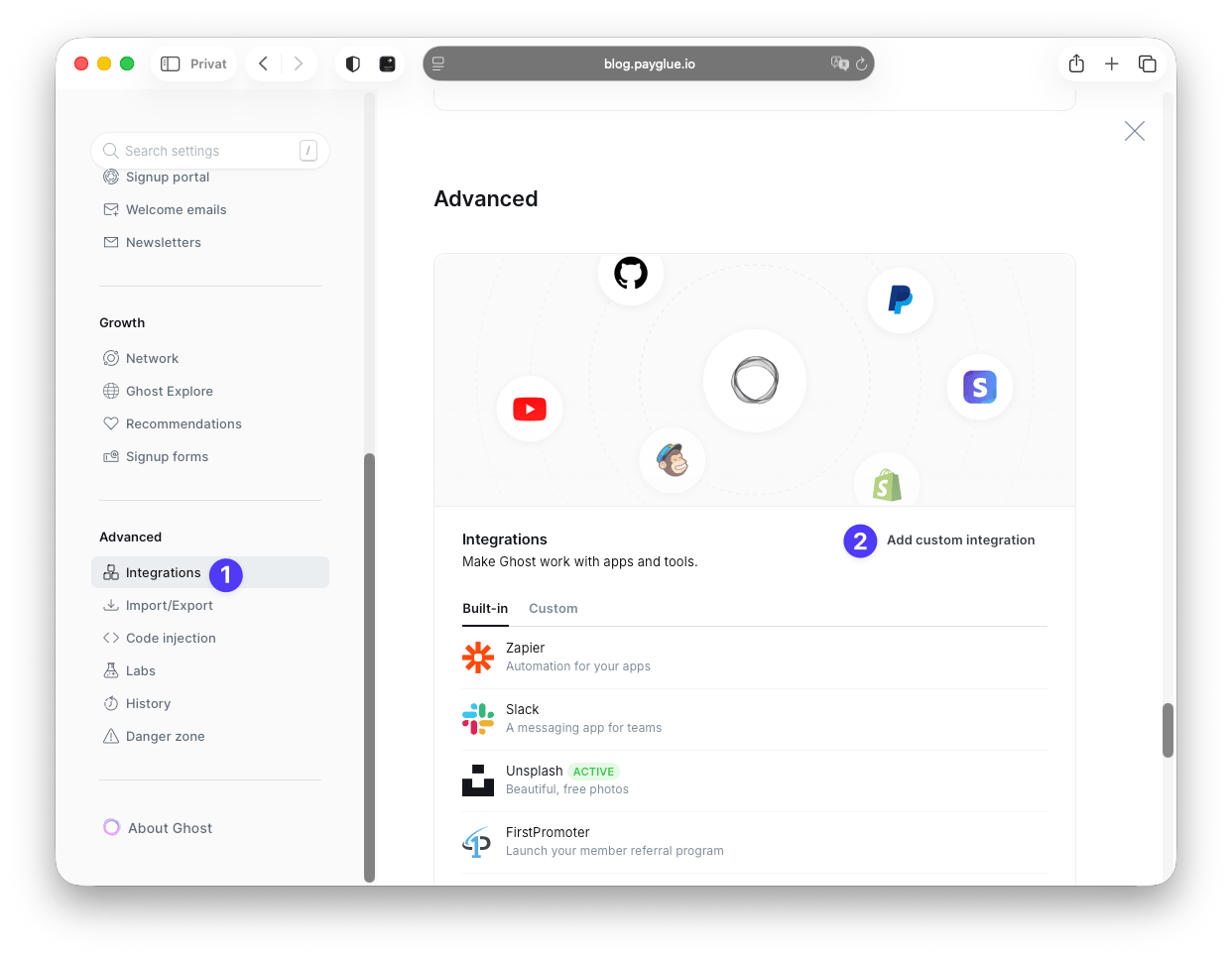
In Ghost, open Settings, then Integrations, then Add custom integration. Name it PayGlue.
Ghost then shows the keys. The Admin API key is the one that matters here.
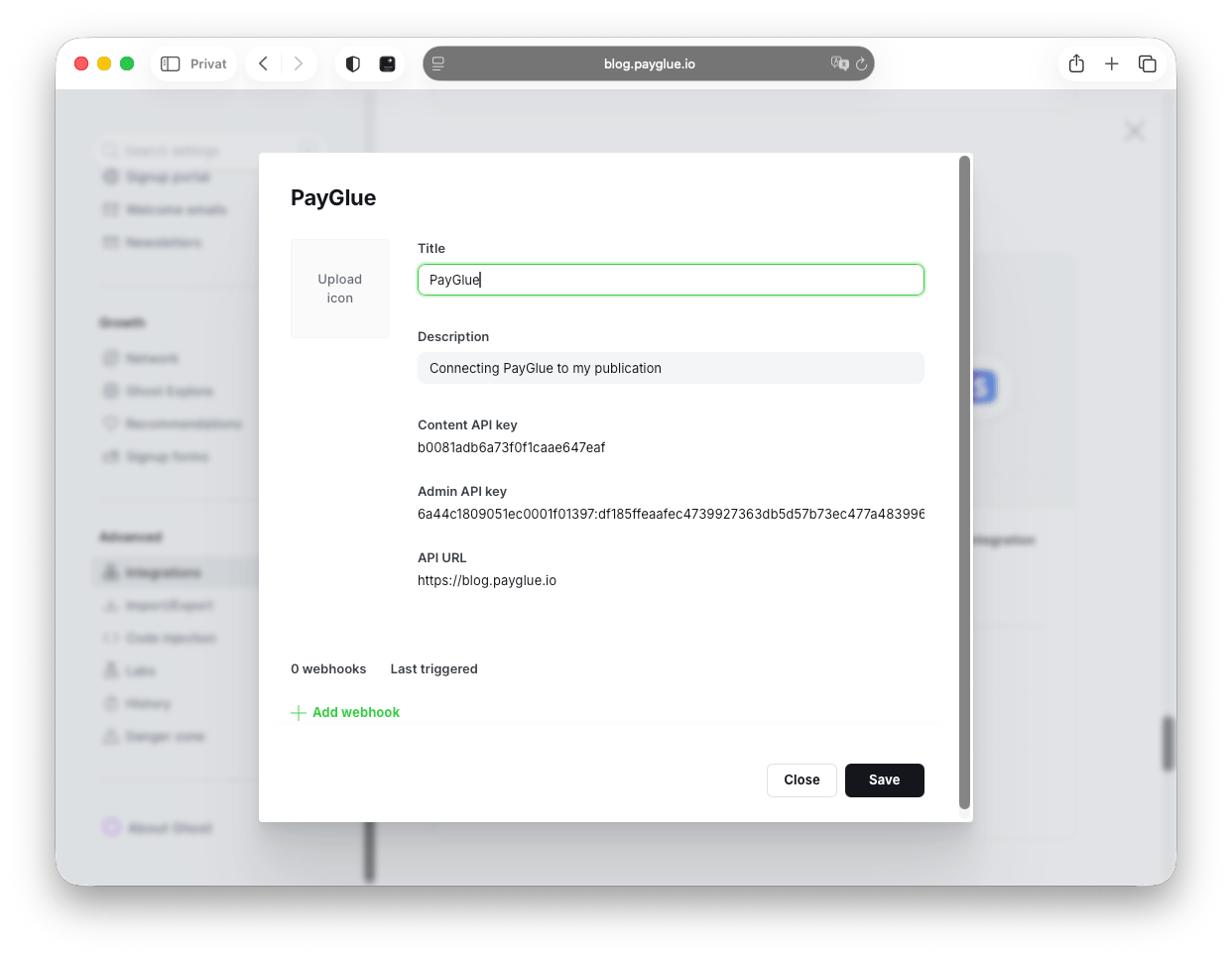
Copy the Admin API key along with your site URL.
The Admin API key can create and modify members. Treat it like a password: PayGlue stores it encrypted and never shows it again once saved.
Create the API key in Lemon Squeezy
In Lemon Squeezy, go to Settings, then API, and create a new key. Copy it.
Paste it into your Lemon Squeezy connection page in PayGlue and save. A Store dropdown appears after saving.
Select the store. This is the step people skip, and the symptom is confusing: everything looks connected but no products ever show up in the editors. A Lemon Squeezy account can hold several stores and there is no way to guess which one you meant.
Set up the webhook
Copy the Webhook URL from the connection page. It looks like this:
https://api.payglue.io/webhooks/lemonsqueezy?tenant=your-org-slugCopy the whole thing, including everything after the question mark. The slug is how the event finds your organisation.
In Lemon Squeezy, go to Settings, then Webhooks, then Add webhook:
- URL: the webhook URL you just copied
- Secret: a random string you invent, around 32 characters
- Events:
order_createdat minimum. For subscriptions also enablesubscription_created,subscription_updated,subscription_cancelledandsubscription_expired
Save it, then paste the same secret into the Webhook Secret field in PayGlue.
That signing secret is worth a sentence of its own. Most providers generate one and show it to you once. Lemon Squeezy makes you invent it, which means the usual failure is not a lost secret but a mismatched one. Paste, do not retype, and watch for a trailing space.
Which events do what
This is the part that decides whether cancellations actually work, so it is worth reading rather than skimming.
| Lemon Squeezy event | What happens in Ghost |
|---|---|
order_created |
Member created, one-time purchase |
subscription_created |
Member created, subscription |
subscription_updated |
Member updated |
subscription_resumed |
Access restored |
subscription_payment_success |
Active membership confirmed |
subscription_cancelled |
Access revoked |
subscription_paused |
Access revoked |
subscription_expired |
Access revoked |
Notice that three separate events revoke access. That is the whole argument against wiring this up by hand in an automation tool: it is easy to catch the purchase and easy to forget that “cancelled”, “paused” and “expired” are three different things that all need the same response. I went through that in detail in the Zapier write-up.
Map a product to a Ghost tier
A payment on its own means nothing until you say what it buys.
Open the Buy Button, Paywall or Pricing Table editor and pick your Lemon Squeezy product from the dropdown. Choose which Ghost newsletter the buyer should be subscribed to and which welcome email they get, then save.
Start with one product and one tier. Confirm it works before you add the rest.
Without a mapping, the event still arrives and PayGlue still verifies it, and then nothing happens. That is by design, but it looks like a failure the first time you see it.
Test it with a real purchase
Set a product to a token amount, buy it yourself, and watch the member appear in Ghost with the right tier. Then refund it.
If nothing arrives, check Analytics, then Webhook Events, first. The distinction there is what saves you time:
- No event at all: delivery problem. The URL in Lemon Squeezy is wrong, or the slug at the end does not match your organisation.
- Event failed: signature mismatch. The two secrets differ.
- Event processed but nothing changed: no mapping for that product.
Three different problems that look identical from the outside and take three different fixes.
Test mode, and the thing it does not isolate
Lemon Squeezy has no separate sandbox. Test mode is a property of the API key: a key created in the Test section sees test store products only.
The webhook URL is the same for both. So is Ghost. A test purchase creates a real Ghost member with real access, which is fine while you are testing and awkward if you forget. Clear the test members out of Ghost Admin before you go live.
The Stripe question
Ghost still wants a Stripe account connected before it will show you the membership settings, even when Stripe will never touch your money.
That is a Ghost interface requirement, not a payment one. If a Stripe account is available to you, connect it, leave it idle, and let Lemon Squeezy do the actual work. If it is not, there is a second path with no Stripe account involved, where access is carried by a label and checked by the paywall script. Both are explained here.
When Lemon Squeezy is the wrong choice
It is a good default and it is not always right.
If most of your income is one-off tips, Ko-fi is less machinery for the same outcome. If you need the widest possible payout coverage rather than the nicest checkout, PayPal reaches countries Lemon Squeezy does not. And if you are already deep in another merchant of record, switching for its own sake buys you nothing.
Pick on payout availability first. Everything else is a tiebreaker.