
Last week a developer in the Ghost forum read the source of our demo post without signing in, saw the whole paid part, and asked whether that also meant the post was readable in RSS, on the social web and through the Content API. It did. The developer was polite about it and right about all of it, and the exchange made me realise that I had never written down, in one place, what a paywall does and does not do. The documentation had a warning box. It deserves an article.
Two kinds of paywalls
Every paywall on the web belongs to one of two families. What separates them is where the decision gets made, and everything else about them follows from that.
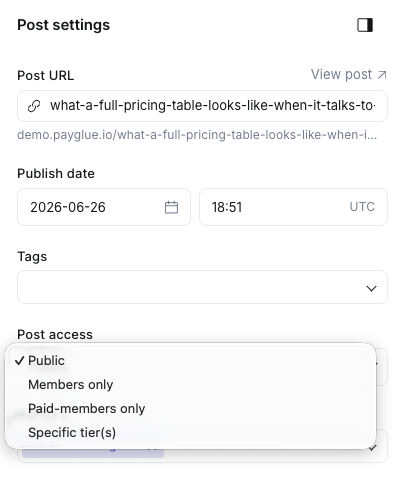
A server-side paywall decides before the page leaves the server. If you are not allowed to read the second half, the server never sends it. Ghost’s own membership gate works this way, with or without Stripe: “Members only” holds a post back for anyone who is not signed in, and the paid level of that gate, “Paid-members only”, is the part that needs Stripe. Substack and Patreon work the same way. There is nothing in the page to uncover, because nothing arrived. The only way past a server-side gate is a person: a shared login, or a copy from someone who paid.
A client-side paywall decides in the browser. The page arrives whole, and a script decides what you get to see. Many newspaper sites work this way, most paywall plugins for content management systems do, and so does the PayGlue overlay. The script hides what it is told to hide, but the browser already holds the whole page, and whatever a browser holds it can display.
Neither family is a mistake. Which one fits you depends on what you publish and on what your setup allows, and the rest of this article is about knowing which one you have.
Why an external paywall for Ghost runs in the browser
Ghost decides on the server what a post contains for a given visitor, and it does that through one mechanism: the post’s access setting, checked against the member’s status. A member is free, paid or complimentary. Paid and complimentary exist only when Stripe is connected. Without Stripe, every member is free, and there is nothing for “Paid-members only” to check against.
Everything outside Ghost talks to it through the Admin API, the Content API and webhooks. Those interfaces can create members, set labels, read posts and receive events. None of them sits in the path where Ghost renders a post, builds the RSS feed or federates to the social web. There is no hook for a third party to say “for this visitor, stop the post here”. The official integrations all live on the same side of that line, and so does PayGlue.
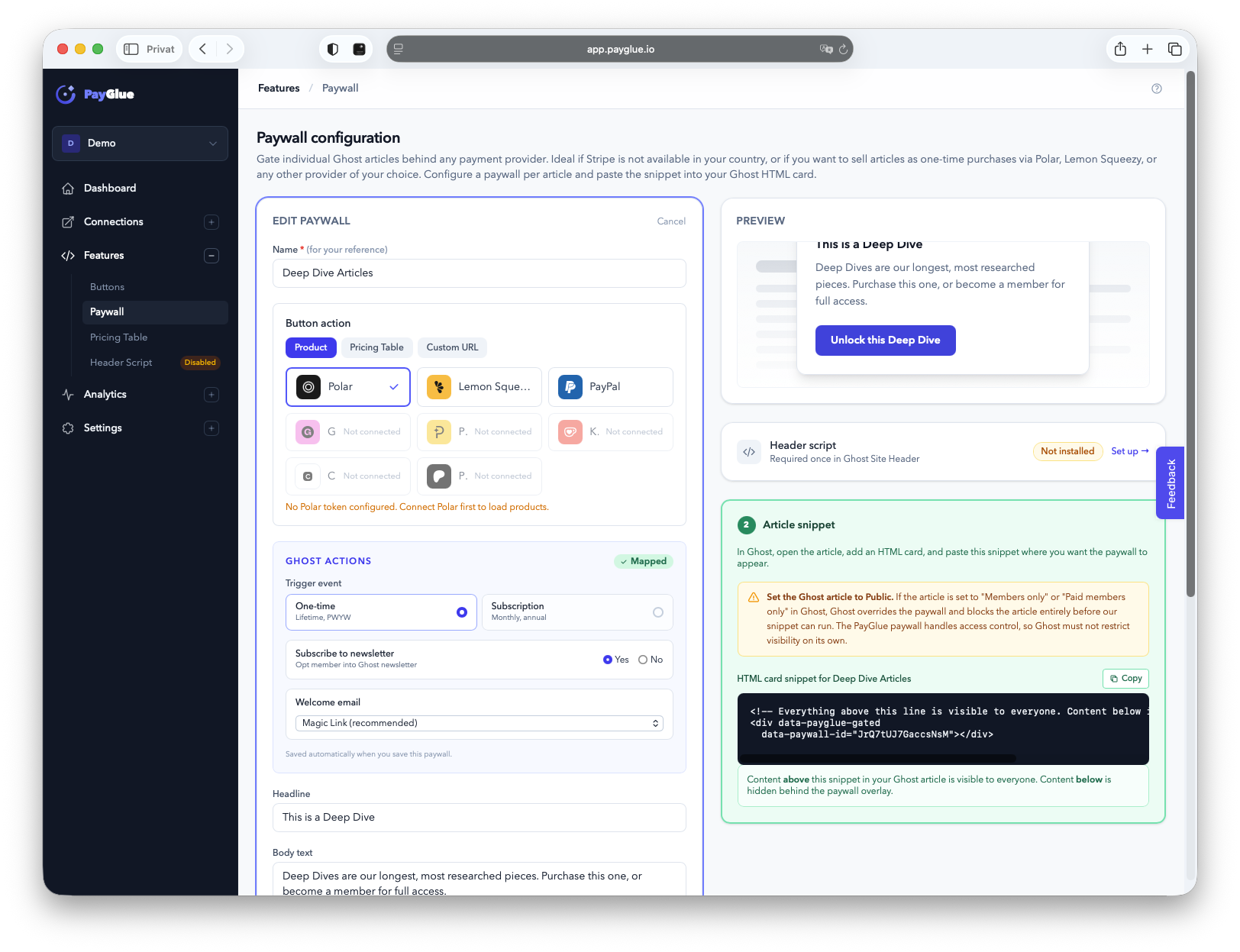
That leaves an external paywall two options. It can hide the content after Ghost has delivered it, which is what PayGlue does. Or it can keep the paid part outside Ghost entirely and inject it after checking access, which means the paid part is no longer a Ghost post, with everything that follows for editing, search, export and backups. I looked at the second option for a while and decided the first was the honest one for a tool that promises to leave your Ghost alone.
This is not a PayGlue peculiarity. Steady, the membership platform many German-speaking publishers use, describes its paywall in its developer documentation as part of a JavaScript widget. On a site Steady does not host, that widget faces exactly the constraint I just described, and it makes exactly the same choice. I say that with respect, not as a dig. Anyone who gates external content from the outside ends up in the browser, because the browser is the only place where an outside tool gets to run.
Newspapers show how normal this is. Everyone knows the moment: you click a headline, read the first paragraphs, and a box slides in with “try the first month for one euro”. Some publishers run that gate on their own servers, many buy it from an external provider, and a good share of those providers work in the browser for the same reason PayGlue does. The principle is decades old and it carries a large part of paid journalism. The one thing that varies is how openly a provider says which family its gate belongs to.
What that means, concretely
This section is about the PayGlue overlay, which is one of three ways to gate a Ghost post. The other two use Ghost’s own gate and behave differently; they come right after this.
With the overlay, the post stays Public in Ghost. Ghost delivers it the way it delivers any public post, and the PayGlue script hides the part below the snippet. So the gated part is hidden only where the script runs, which means in a browser, with JavaScript on.
Everywhere else it is readable. Ghost puts the full post in the RSS feed, so a feed reader shows all of it. Ghost federates the full post, so the social web gets all of it too. The Content API returns it, it is in the page source, and a reader who has JavaScript off or uses a reading mode sees it as well. Search engines can crawl it, because the text is in the HTML.
The feed and the social web are the part that matters most, and the part I had not written down. Nobody has to try to read the post there. A subscriber to your RSS feed sees the whole thing in their reader without ever knowing there was a gate. That is a different situation from someone deliberately looking under the curtain, and it is the one thing to decide about before you use a client-side gate for content that must not travel.
The three ways to gate a post
Once the two families are clear, the choices for a Ghost site fall into three setups. The paywall documentation has the long version; this is the comparison and the short form of each.
| Option 1 | Option 2 | Option 3 | |
|---|---|---|---|
| Setup | Public post, PayGlue overlay | Members only | Paid-members only |
| Stripe needed | No | No | Yes, an idle account is enough |
| Gate runs | In the browser | On the server | On the server |
| Feed, social web, API | Full post | Public part only | Public part only |
| Who reads the gated part | Members with PayGlue access | Every member, free ones too | Stripe subscribers and PayGlue buyers |
| At the gate the reader sees | Your overlay with your offers | Ghost’s free signup box | Ghost’s upgrade box, pointing at Stripe |
| Your offers go | Into the overlay | Membership page, public part | Membership page, public part |
Option 1: Public post with the PayGlue overlay. No Stripe needed. Your offers, from whichever provider you use, sit right at the gate, because the overlay is yours. The gated part stays readable in feeds and APIs, as described above. This is the setup for publishers who cannot use Stripe, or do not want to, and whose content can live with a soft gate. Details.
Option 2: Members only, with Ghost’s own gate. Also without Stripe. Ghost holds the post back on the server, so feeds and APIs carry only the public part. The fine print is that every member is a free member without Stripe, so anyone who signs up for free reads the post. It is hard against the outside world and open to anyone who types in an email address. Useful for content that should be off the open web, and as the top of a funnel that leads to a membership page with your offers. Details.
Option 3: Paid-members only, with a Stripe account connected. The account can stay idle. PayGlue gives every buyer a complimentary membership, Ghost counts them as paid, and Ghost’s gate holds the post back for everyone else, feed and social web included. This is the server-side paywall for readers who paid through Polar, Paddle, Lemon Squeezy or any other provider PayGlue connects. The one thing to plan for is that Ghost’s own upgrade box at the gate points at Stripe, so your offers need a visible home elsewhere on the page or on a membership page. Details.
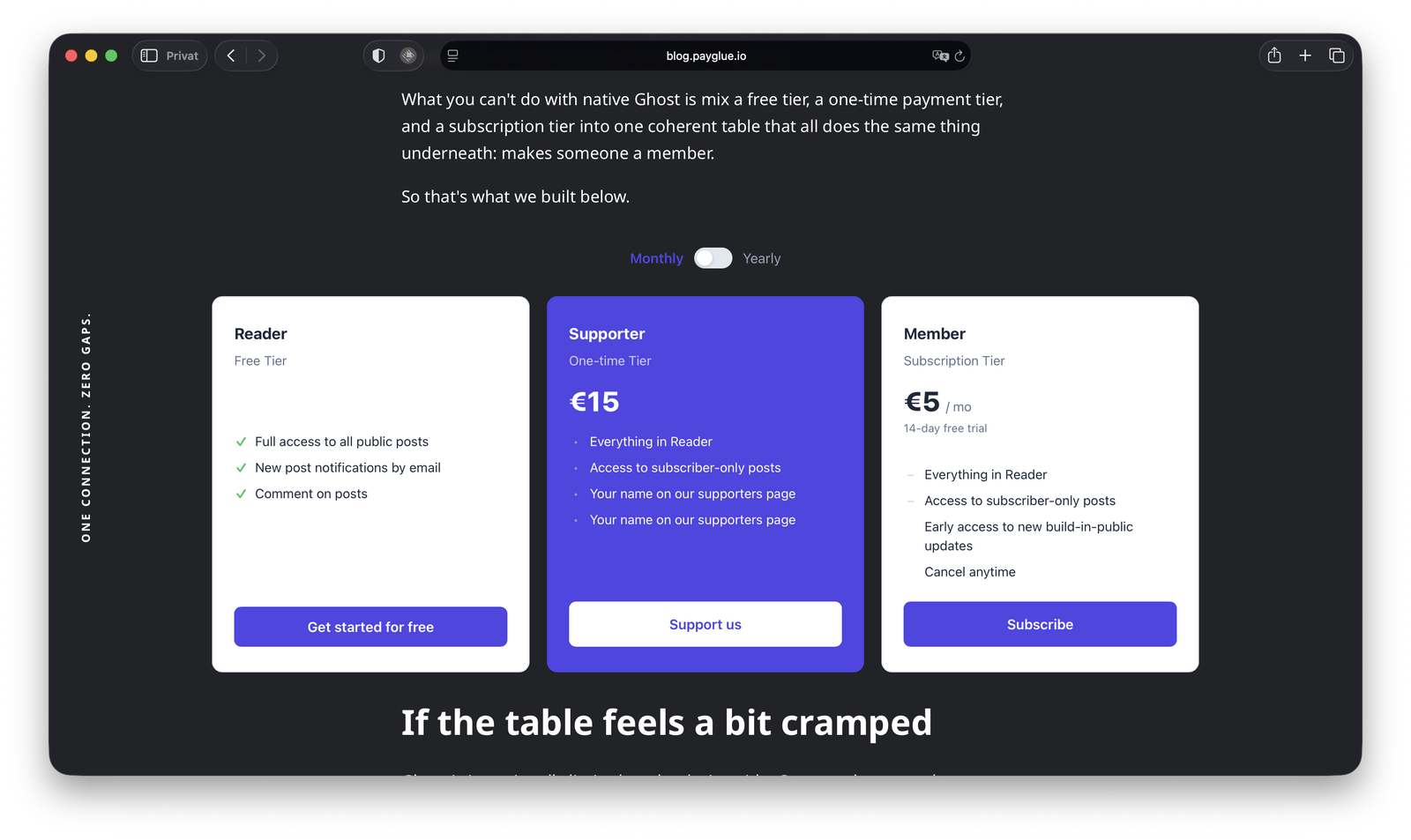
You can run all three on one site. A public teaser post with the overlay, a members-only archive, and paid deep dives behind Ghost’s gate are three settings on three posts, and PayGlue serves the same member list underneath. Whose Member Is It explains why that member list, in your Ghost and with your labels, is the part worth protecting more than any single post.
Where the line really is
What follows is opinion rather than documentation, and it took me longer to write than everything above it.
No wall is absolute, and that includes the server-side kind. In 1999 a fifteen-year-old in Florida worked his way into computers of the US Department of Defense and NASA from his bedroom, and became the first juvenile in the United States sentenced to prison for it. The Justice Department’s press release from the time has the details. If a teenager could do that to systems built by people whose whole job was keeping him out, a membership gate on a blog was never going to stop someone who has decided to get through.
That was before large language models. Today the same determination needs far less knowledge. Anyone who wants to get around a lock, of any kind, on any site, can have the steps explained to them in plain language in a minute. I am not calling readers criminals, and most people never think about it. I bring it up because it changes what a paywall can reasonably be asked to do: the technical strength of the gate has stopped being the interesting variable.
Think about who the person on the other side of that curtain actually is. Somebody who wanted to read one article without paying, and did. You will not notice, and they were never going to become a member anyway. No paywall, server-side or client-side, converts that person. The question a paywall answers is a different one: what do you show the people who were open to paying, at the moment they decide?
Why it still works, whoever you are
This is the part I believe most firmly, and it is the reason the PayGlue overlay sits in front of my own writing on three blogs.
People do not pay because reading without paying is impossible. They pay for the writing, for the writer, and for what comes with the membership: the archive, the community, the early access, the occasional call, the feeling of keeping something alive that they want to exist. There are more than enough readers out there who value a well-researched article and the extras around it, and who will pay a fair price when the offer is in front of them at the right moment. That is where a paywall earns its keep, and the client-side kind is very good at exactly that: the reader hits the gate, sees the offers from the provider you actually use, and decides.
If you are starting out, start with option 1. Put the overlay on the second half of your best posts, watch what readers respond to, and learn what your members actually value. Nothing about that setup limits you later. If your content grows into something that must stay out of feeds, connect an idle Stripe account and move those posts to option 3; every buyer you already have passes that gate too, because PayGlue gave them a complimentary membership from the first day. If you are already a heavy user with a large archive, mix: overlay on the essays, Ghost’s gate on the premium archive, members only on the community notes. The member list stays one list.
The end of the “you can get through anyway” discussion
I want to close this discussion for good, at least for myself. Yes, you can get through. You could get through in 1999, you can get through now, and you can get through a server-side gate too if you know someone with a login. That has never been the point. The point is that a publisher decides what to show, at what price, to the people who care, and that the decision is visible where they make it.
The paywall is also only one door in the house. What PayGlue is for is the part behind it: selling memberships on Ghost with a provider other than Stripe, and having every buyer land in your own Ghost as your own member, with your labels, on your list. The overlay, the buy button and the pricing table are the ways a reader gets there. Which of the three gates you put on a post is a setting you can change tomorrow, and the members you gained through it stay on your list when you do.
If you want the technical detail, it is in the documentation, next to the snippet and on its own pages, written so that you can make the trade knowingly. And if you find something there that does not match what you see in your Ghost, tell me. That is how this article came about.