
This is the most common provider change I see, and it is calmer than people expect, because Ghost’s native Stripe billing and an outside provider do not compete for anything. They can both feed the same site indefinitely.
What makes it go wrong is doing the steps in the wrong order, so this is written as an order.
What is actually changing
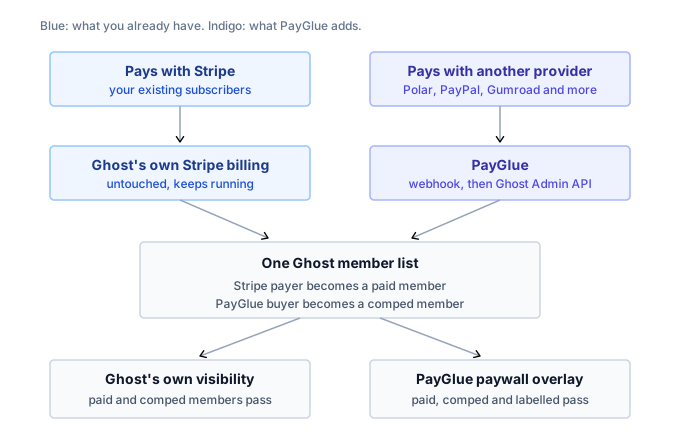
Ghost’s built-in billing talks to Stripe directly. Stripe takes the money, Ghost hears about it through its own integration, and Ghost grants the tier.
The new arrangement runs alongside that. Your chosen provider takes the money, sends a webhook when somebody pays, and something translates that into a Ghost membership through the Admin API.
Two paths into the same member list. Ghost does not mind, because a member record does not say which provider paid for it. Ghost knows the member has a tier.
That is the whole reason this migration is low risk: you are not replacing anything, you are adding a second path and then stopping using the first one.
Before you start, one decision
Existing Stripe subscribers cannot be moved. A subscription is an authorisation held by Stripe, not a row you can export, so there is no transfer. The full explanation is here.
So decide now: they run out where they are. New sales go to the new provider. Both run until the last Stripe subscription ends.
If you were hoping to consolidate everything by Friday, that is the expectation to adjust before you touch any settings.
1. Pick the provider, then check one thing
Which provider suits you is a real question and there are guides for each. The comparison is here.
Before anything else, confirm it pays out to your bank account. This is binary, it eliminates more candidates than every other consideration, and it is checkable in ten minutes in the provider’s own documentation. A cheaper provider that cannot send you money is not a candidate.
If tax handling is part of why you are leaving Stripe, note that a merchant of record makes that obligation theirs rather than yours. What that means.
2. Connect Ghost, and leave Stripe alone
In Ghost, open Settings, then Integrations, then Add custom integration. Name it after whatever is doing the translating. Copy the Admin API key and your site URL.
That key can create and modify members, so treat it like a password.
Do not disconnect Stripe. Two reasons. Your existing subscribers are still billed through it. And Ghost hides its membership settings entirely when no Stripe account is connected, which means disconnecting it takes away the interface you need for the tiers everything else depends on. Why Ghost behaves that way.
Stripe stays connected and simply stops receiving new business.
3. Connect the new provider
Webhook URL into the provider, signing secret back out, events selected. Each provider differs in the details and each has its own guide: Polar, Lemon Squeezy, Paddle, Creem, Gumroad, PayPal, Ko-fi and Patreon.
Then run the health check before going further. It confirms both ends at once, and finding a bad key here is much cheaper than finding it after you have pointed customers at a checkout.
4. Map products to the tiers you already have
Your Ghost tiers exist and have members on them. Do not create new ones.
Map each product at the new provider to the tier a buyer should land on. Same tiers, second way in. A Stripe subscriber and a new-provider subscriber on the same tier are then indistinguishable to Ghost, which is what you want for gating, newsletters and everything else.
5. Test before anybody sees it
Buy your own product at a token amount. Watch the event arrive, the member get created, the tier land correctly.
Then log out, confirm a gated post is closed to a stranger, log in as the test member, confirm it opens.
Then cancel, and confirm the access goes away.
The cancellation is the half people skip, and it is the half that fails silently. A broken grant produces an email within the hour. A broken revoke produces nothing for months. The full checklist.
5b. Moving a post onto the PayGlue overlay
Skip this if your posts stay on Ghost’s own visibility settings.
If you do move a post to the PayGlue paywall overlay, which people often do at the same time as changing provider, your existing Stripe subscribers keep their access. The overlay recognises a paid Ghost member, a complimentary one, and anyone the new provider has granted, so all three groups pass without you preparing anything.
6. Switch where the buttons point
Only now. Replace the checkout links on your pricing page, in your welcome emails, and anywhere else you have quietly hard-coded a Stripe checkout over the years.
That last category is where the leaks are. Old newsletters, a link in your site footer, the reply template in your support inbox. Search for the old URL rather than trusting memory.
7. Wait out the Stripe subscriptions
Leave Ghost’s Stripe connection in place until the last subscription through it has ended.
Turning it off early means the final cancellations never reach Ghost, and those members keep access they have stopped paying for. Nothing alerts you, because from Ghost’s side nothing happened.
Monthly subscribers clear in about a month. Annual ones can take a year. There is no cost to leaving it connected, and Ghost wants a Stripe account connected anyway.
The one thing to pre-empt
Members granted through the Admin API appear in Ghost as complimentary, and Ghost’s account area may tell them to manage their subscription through Stripe.
Their access is correct. The wording is Ghost’s, it assumes Stripe is the only way to be a paying member, and it produces support mail from confused people.
One line in your welcome email saying where they actually manage their subscription costs nothing and saves the conversation.
Related: running two providers at once, and what happens to active subscriptions.