
I build a tool that connects Ghost to payment providers. For a while, my own blog ran on Ghost too. That felt obvious right up until it stopped being obvious.
Where it started
The first version of this blog lived on a free Ghost(Pro) site, one step up from blog.ghost.io. It made sense at the time. I already knew the editor, I was writing about Ghost anyway, and setting up anything else felt like a detour from shipping the actual product.
It stayed sensible for a few months. Then the site started arguing with what I was trying to build.
What actually broke
Nothing broke in the sense of an outage. It broke in the sense of pulling in two directions at once.
A Ghost theme is built to be a Ghost theme: rendered by Ghost’s own engine, styled in Handlebars, deployed as a zip file through Ghost’s admin. Everything else I run, the dashboard, the landing pages, the pricing tools, is nothing like that. For a product whose entire pitch is connecting Ghost to other systems, running the company blog as a Ghost theme meant maintaining a second, unrelated stack just for content. Faster builds, my own consent and analytics setup, tighter control over metadata: every one of those had to be built twice, or skipped once, for the blog.
The harder problem was search. I write about Ghost, payment providers, and the space between them, and I wanted that writing to rank for payglue.io, not for a Ghost(Pro) subdomain that shares nothing with my own domain’s authority. A subscription business betting on organic search cannot afford to build that authority on a URL it doesn’t fully own.
Once I said that out loud, the fix was obvious. The blog needed to live at payglue.io, in the same static build as the rest of the site, not on a separate platform I was renting for its editor.
What I did about it
I pulled every article out, rebuilt the blog as part of my own site at payglue.io/blog, and pointed the old addresses at the new ones so nothing already linking to me broke.
That solved the content problem. It left the Ghost site sitting there, already configured, already carrying real posts and real members, doing nothing.
Ghost’s second job: being the demo
I didn’t shut it down. I turned it into something almost nobody selling a Ghost-and-payments tool actually offers: a live site you can click.
Most tools like mine show you a screenshot of a paywall and ask you to trust it. Mine has a real one, on a real post, on a real Ghost site, gating real writing, and you can pay a sandbox amount and watch the access show up. How This Blog Runs with a PayGlue Paywall walks through exactly what happens when you hit it.
The same site carries a working Pricing Table, mixing a free tier, a one-time purchase and a subscription, and a Buy Button selling one thing with no paywall around it. Every provider I support can run its sandbox checkout behind any of the three. If you’re trying to picture how PayGlue would look on your own Ghost site, that Ghost site answers faster than this paragraph can.
And Ghost’s third job: sending my newsletter
I also use Ghost’s own newsletter tool to send my newsletter. Not because I lack alternatives. Brevo and Mailgun both already run in production, for transactional mail and for the newsletter’s actual delivery. I stay in Ghost for the part in between, writing the thing, because its editor is the best one I’ve used, and because I’m in it every day anyway.
It’s the restaurant-kitchen version of choosing infrastructure. You can cook well in more than one kitchen, but you keep going back to the one where you already know every burner works.
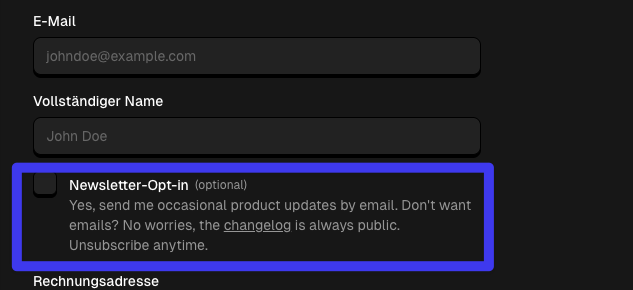
If you subscribe to PayGlue itself, the checkout carries one unchecked box: occasional product updates by email. No pressure if you’d rather not, the changelog stays public either way, and leaving is one click whenever you change your mind.
The short version
I build for Ghost, which is exactly why my own blog doesn’t run on it. A SaaS marketing site and a Ghost membership site want different things from their infrastructure, and trying to make one platform do both cost more than it saved. The blog moved to my own domain. Ghost stayed, doing the two jobs it’s actually good at here: being the live demo you can click, and being where I write the newsletter.
Want to see the part that used to be a Ghost theme? See how it runs today. Want to see what PayGlue looks like from the other side, on your own Ghost site? Start here.