My open-source build had a test suite of 579 tests. Every one of them passed. Continuous integration built the published tree on every pull request, type-checked it, ran the frontend suite and the backend suite, and came back green. I had spent two days making sure the thing I publish is the thing I test.
Then I cloned it onto a laptop and followed my own instructions.
It broke on step one.
The instruction that broke the install
My quickstart said this, and had said it for months:
git clone https://github.com/PayGlue/PayGlue-OS.git
cd PayGlue-OS
cp .env.example .env   # fill in secrets, every variable is annotated
docker compose up -d postgres redis
docker compose run --rm web python manage.py migrate
The third line copies an example environment file. Inside it, among the annotated variables, sat this:
# Encrypts stored provider credentials at rest (Fernet).
CREDENTIAL_ENCRYPTION_KEY=change-me-use-openssl-rand-base64-32
That placeholder is not a valid encryption key. It is a sentence telling you to replace it. Reasonable enough, except for what happens when you do not read it that closely: the application refuses to start, at import time, with a stack trace ending in
ValueError: Invalid CREDENTIAL_ENCRYPTION_KEYNo hint about what a valid one looks like. No pointer to the command that makes one. Just a rejection, before the first screen.
Now for the part that turns an annoyance into a genuinely bad first impression. The Docker Compose file carries a working default for that same variable:
CREDENTIAL_ENCRYPTION_KEY: ${CREDENTIAL_ENCRYPTION_KEY:-bWFzdGVya2V5Zm9ybG9jYWxkZXZlbG9wbWVudG9ubHk=}The :- means “use this if the variable is unset”. Copying the example file sets the variable, to a broken value, which overrides the working default.
Which means following my instructions left you worse off than ignoring them. Skip the cp line and the software starts. Follow it and it dies. My own guide was the bug.
The workaround that does not work either
The second thing was ports. The compose file published four of them on the host:
ports:
  - "5432:5432"   # Postgres
  - "6379:6379"   # Redis
  - "8000:8000"   # backend
  - "5173:5173"   # dashboard
The laptop in question already ran a Postgres on 5432, as most developer machines do. Docker said what Docker says:
Bind for 0.0.0.0:5432 failed: port is already allocatedFine. Docker Compose has an override mechanism exactly for this: drop a docker-compose.override.yml next to the original, redeclare what you want to change, done. So I wrote one.
It failed with the same error.
Compose appends list-type fields rather than replacing them. The override did not change 5432:5432 into 55432:5432. It added a second entry, and the first one still collided. The escape hatch that every guide on the internet recommends does not apply to ports.
There is a fix, ports: !override ["55432:5432"], added to Compose in 2024 and known to approximately nobody. The realistic alternative is editing a file that is under version control, and then carrying that edit through every future git pull forever.
Why 579 tests saw none of this
This is the uncomfortable part, and it generalises well beyond this project.
A test suite runs against an environment your test runner prepared. It imports settings that already exist, talks to a database that is already up, and uses credentials your fixtures set. It answers one question: does the code behave correctly when everything around it is correct?
That is a worthwhile question, and it is not the one a stranger is asking. Theirs is simpler: can I get from a URL to a running system using only what you wrote down?
Nothing in a test suite executes the sentence “copy this file”. No assertion checks whether the placeholder inside it is valid. No fixture tries to bind port 5432 on a machine where something else already listens. Those are not code paths at all. They sit in the gap between your code and whoever is reading it, and nothing measures that gap except somebody with an empty folder and your instructions.
I had already learned a version of this lesson the hard way. A few weeks earlier I discovered that the main branch of the public repository had been broken for two commits and nobody had noticed, because I tested the tree I keep and never the tree I publish. I fixed it properly: a job that syncs the published copy into a throwaway directory on every pull request and builds and tests it there. I called it the shadow build, and it works.
It also would not have caught a single thing in this article. It proves the published tree builds. It never proves the published tree installs. Those are two different promises, and I had only been making the first one.
What the install was supposed to prove
The install run was not scheduled to hunt bugs. It was the acceptance test for a much larger piece of work, and that work is the actual news in release v0.4.0.
Until now, running PayGlue yourself started with creating a Supabase project. Not as a recommendation. The frontend threw an exception at import time if two environment variables were missing, so without a Supabase account the application did not boot at all. Somebody who wanted twenty minutes to decide whether the tool was worth their time had to first sign up for somebody else’s service.
That is a bizarre thing to ask, and it is exactly the kind of requirement you stop seeing when you built it. My own installations have had those variables set since the first week.
So I made the identity provider a choice. An installation can now keep its accounts in its own database: the framework hashes the passwords, the framework’s token generator carries the password reset links, and the API issues the same kind of token it always did. A hosted provider remains fully supported and brings what only it can, authenticator apps, magic links, sign-in with Google or GitHub. Where those do not exist, the screens for them are hidden rather than shown and broken.
The important part was doing this without forking the application into two versions. There is one seam, one small module that answers “where does identity come from here”, and a capabilities object describing what this particular installation can do. A screen that offers an authenticator app asks whether authenticator apps exist, and leaves the section out otherwise. Nothing is duplicated, and there is no second build anybody has to remember to test.
A wizard, and what it is not allowed to do
A fresh installation has no account, which meant the first thing it showed you was a sign-in page you had no key for. Now it opens a setup wizard instead.
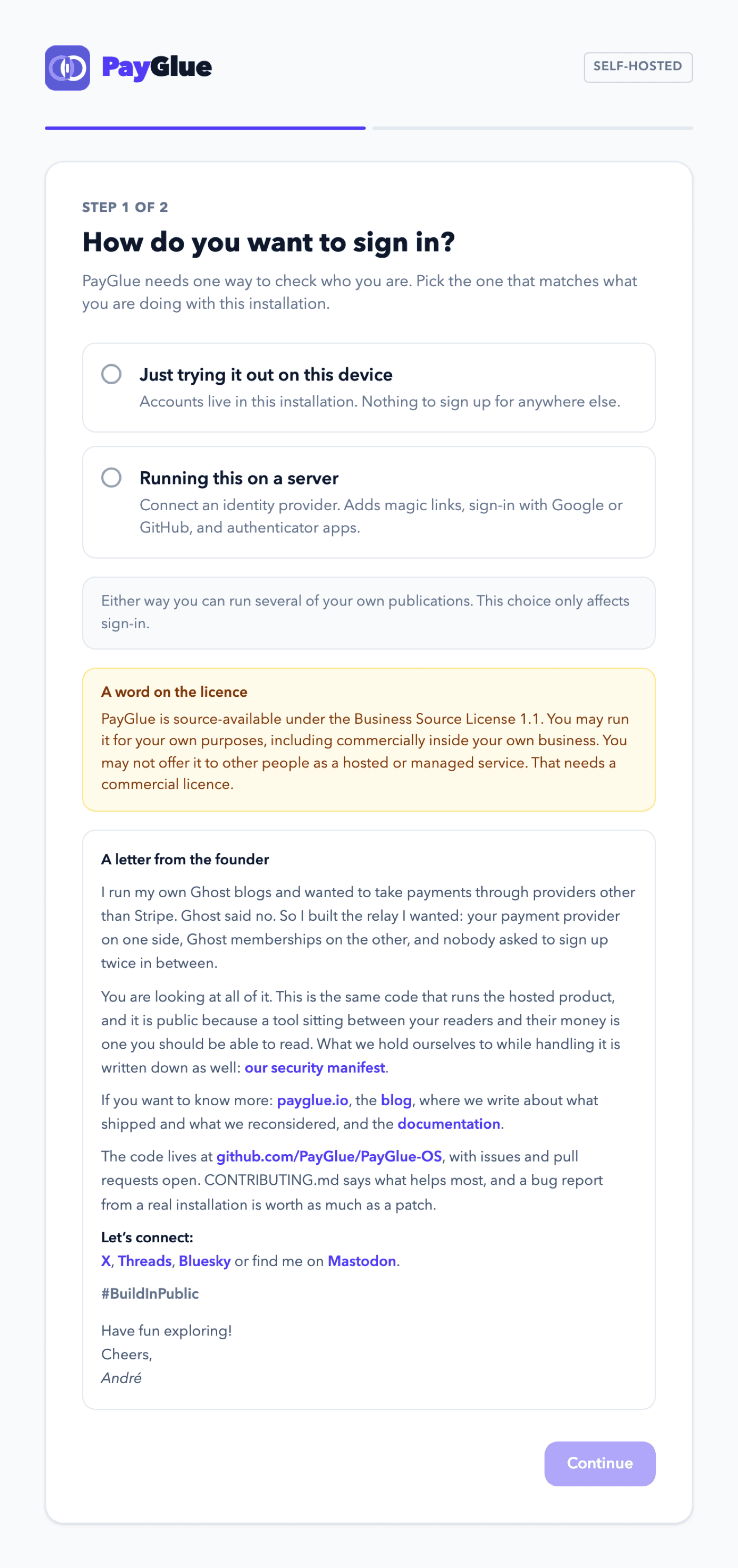
Two steps: how sign-in works, then the first account. Everything after that is the publication and Ghost screens the application always had, so the wizard hands over rather than carrying a second copy of them.
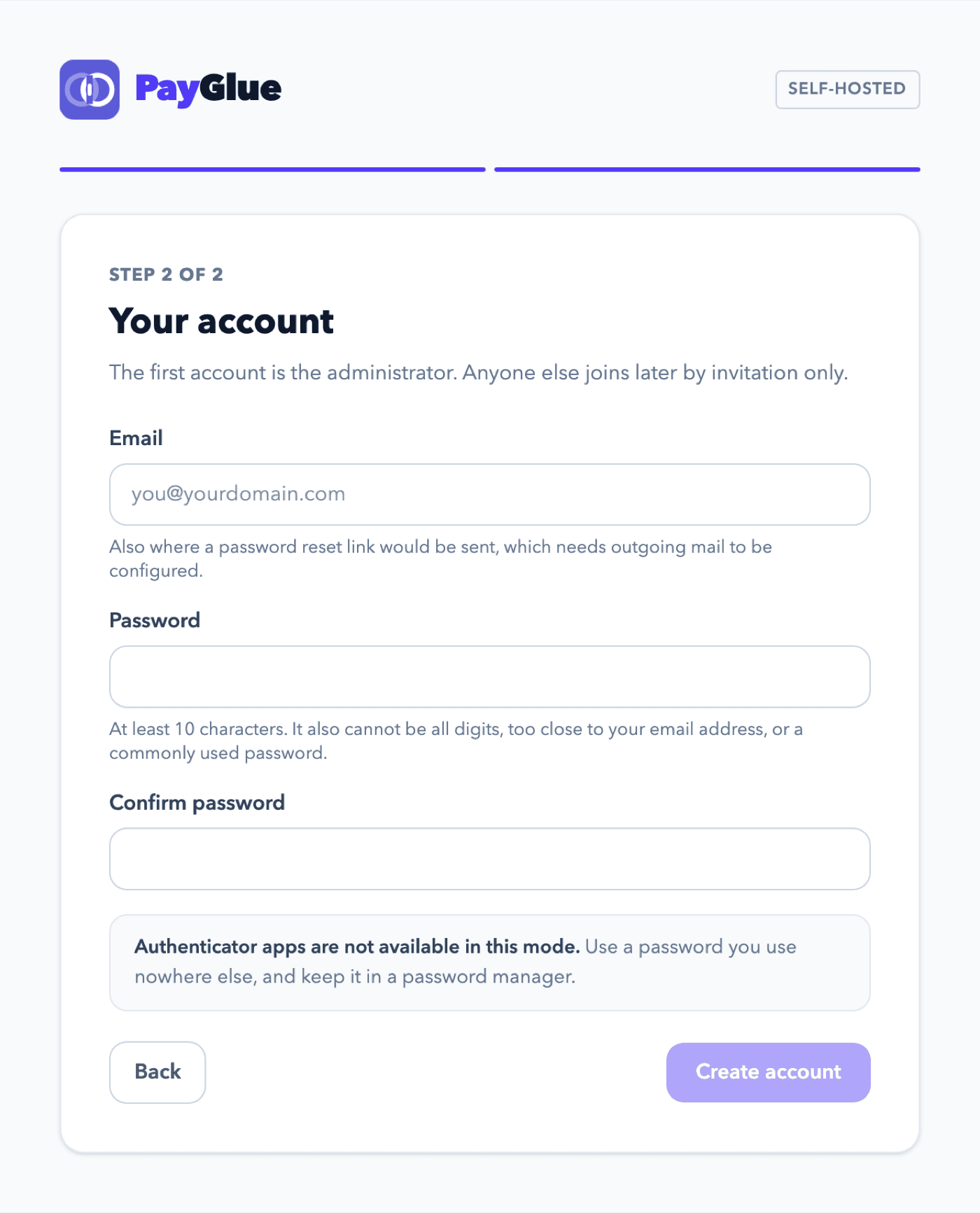
One design decision in there is worth stealing. The password rules the wizard shows are the rules the server actually enforces, and only those.
My original mockup promised the familiar set: eight characters, an uppercase letter, a number, a special character, with green ticks appearing as you type. The backend enforces something else entirely. Ten characters, not entirely numeric, not too similar to your email address, and not among the twenty thousand most common passwords.
Had I built the mockup, the form would have shown four green ticks and then the server would have refused the password anyway. A form that says everything is fine, immediately before something else says it is not, is a genuinely annoying thing to do to somebody.
So the wizard shows the one rule it can honestly evaluate in the browser, the length, and lets the other three come back as the server’s own words. Type password12345 and you get, verbatim:
This password is too common.
Not a paraphrase. The message the validator itself produced.
The gate that is not in the interface
There is one more thing in the wizard that matters more than it looks, and it is invisible.
The wizard appears only while the installation has no account, and it closes permanently once one exists. An obvious way to build that is a flag: the frontend asks the backend “do you need setting up”, gets a yes, shows the form.
If that flag is all that protects account creation, then an installation reachable from the internet during setup has an open registration endpoint. That is about the easiest way to lose a server that there is.
So the check is not a flag. The endpoint counts rows in its own database, and refuses if there are any. Nothing the browser sends is trusted, and there is no request that reopens the gate.
While reviewing this I found the gate had a hole anyway. The code asked whether the table was empty and then inserted. Between those two statements there is nothing. Two requests arriving together both find it empty, both insert, and with two different email addresses both succeed. An installation ends up with two administrators, and the rule the whole thing rests on, that everyone after the first arrives by invitation, quietly stops being true.
I closed it with a unique index rather than more code. The account created at setup carries a flag, and a conditional unique constraint permits exactly one row carrying it. The second concurrent request is refused by the database, no matter how the two are interleaved. A branch can be raced. An index cannot.
What I would tell you to do tomorrow
If you maintain something other people are meant to install, here is the whole method, and it costs an afternoon.
Clone your own repository into an empty folder, on a machine that has never run it. Follow your own guide word for word. Change nothing the guide does not tell you to change, and specifically do not use anything you know that is not written down.
Then write down every single moment you had to think.
Every one of those is a bug. Not a documentation improvement, a bug, because the effect on the person is identical to a crash: they wanted a running system, and they do not have one. Some are small. Mine were a placeholder that stopped the application from starting and a port list that could not be overridden, and both sat between a stranger and their first success for months while my CI stayed green the entire time.
Do it before every release, not on every merge. It is handwork, and it should stay handwork, because the value comes from a person noticing friction rather than an assertion checking a value.
I ran this one twice from a clean clone before it went out. The second time, I touched nothing but the environment file. Migrations ran, five containers came up, the backend reported it wanted setting up, and the wizard appeared.
That is a smaller claim than “all tests pass”, and it is the one that matters to somebody deciding whether to give your project twenty minutes.
 GitHubPayGlue