
Open a member in Ghost Admin that came through PayGlue and you get four labels and a note. It looks like debugging output, and to an extent it is, but it is the debugging output you will actually use: between them these fields answer nearly every support question about a paying reader without opening a single provider dashboard.
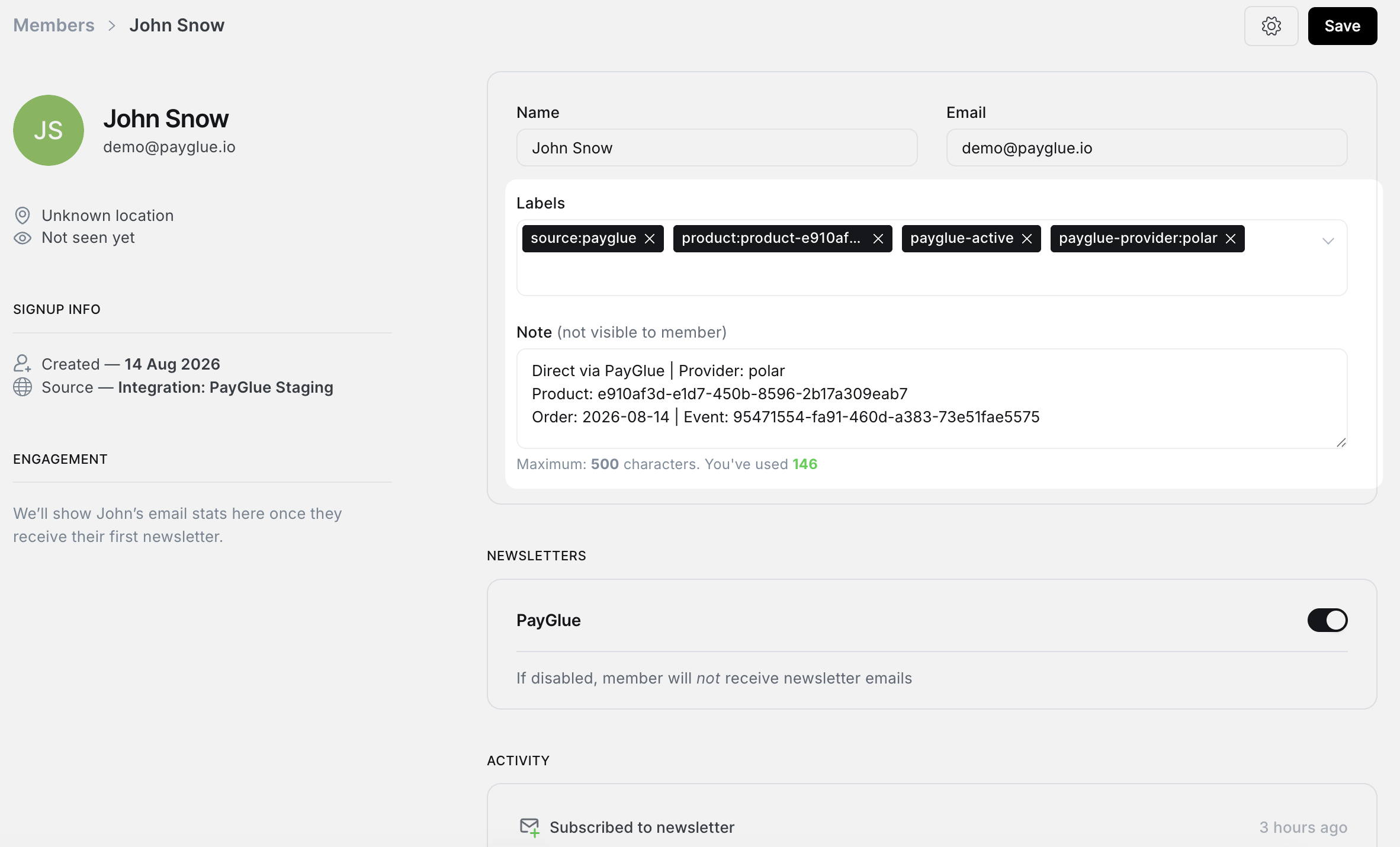
Here is each one, what it is for, and the mistakes people make reading them.
The four labels
source:payglue
product:pricing-tier-2
payglue-active
payglue-provider:polar
source:payglue says where this member came from. It never changes and it is never removed. Its job is to let you filter your member list into “people PayGlue created” and “everybody else”, which matters on a site that also has Stripe subscribers or imported members.
product:<something> says what they bought, using the access key rather than the provider’s product id. If you sell three tiers, this is how you tell which one somebody has.
payglue-active is the one that matters most. It means they have access right now, and it is what the paywall looks for. When a subscription ends, this label comes off.
payglue-provider:<name> says who took the money. Polar, Paddle, Ko-fi, whichever. It stays on the member even after the membership ends, because “who sold to this person” is still true afterwards.
The label that appears when they leave
When a membership ends, payglue-active is replaced by payglue-ended:
source:payglue
product:pricing-tier-2
payglue-ended
payglue-provider:polar
The status flips rather than disappearing, and that distinction is the whole reason the ended label exists.
A member with no status label at all is ambiguous in a way that costs you time later. It could be somebody who cancelled, somebody whose purchase never granted anything because a rule was missing, or somebody who was never a customer and got here another way. Three different situations, three different responses, and they used to look identical.
With payglue-ended present, “this person was a customer and is not any more” is a fact you can read rather than infer.
The note
Underneath the labels, the member note carries what the labels cannot:
Direct via PayGlue | Provider: polar
Product: e910af3d-e1d7-450b-8596-2b17a309eab7
Order: 2026-08-14 | Event: 5e38bc88-0ff7-4b56-a379-78f058f853a6
Ended: 2026-08-14 | Event: c583ab77-e7d3-4b77-b33c-b63ba22c28b7
Line by line: which provider, the provider’s own product id, when they bought and which event said so, and when it ended and which event said that.
The product line is the provider’s id rather than your access key, which is deliberate. When you need to look something up in the provider’s dashboard, that is the string you paste into their search box.
The last two lines carry both a date and an event reference, so a question three months later has an answer without guessing.
What the note does not do
It is not a history. Each purchase rewrites it, so a member who bought, left and bought again shows the second purchase and nothing about the first. The ending line goes with it, which is intentional: a stale “Ended” line sitting above an active membership would be worse than no line at all.
If you need the full sequence, the event log has it. The note is a summary of the current state, sized to fit the 500 characters Ghost allows.
The flag that is not a label
On sites with Stripe connected, PayGlue also sets Ghost’s comped flag, and it does not appear in the labels or the note at all.
That flag is what makes Ghost treat the member as paid, so its own gating, tiers and portal behave normally. Without Stripe connected there is nothing for Ghost to hang that on, so the flag stays off and the paywall overlay does the gating instead.
Two consequences worth knowing. Comped members show up in your Stripe dashboard as subscriptions for zero, and on a cancellation the flag comes off along with the label.
Removing access by hand
Sometimes you need to, usually after a refund, which does not remove anybody on its own.
- Remove payglue-active.
- If the member shows as comped, switch it off.
Both work immediately. Doing both is safe on either kind of site.
Leave source:payglue and the provider label alone. They record where the person came from, and deleting that makes a future question unanswerable for no benefit.
Using them for real work
Filtering. Ghost lets you filter members by label. payglue-provider:kofi gives you everybody who came through Ko-fi, which is how you find the group affected when one provider has a problem.
Support. Somebody writes in asking why they cannot read a post. Open the member: the status label says whether they should have access, and the provider label says where to look next.
Reconciling. Comparing your provider’s subscriber count against payglue-active in Ghost is a rough but fast check that the two are still in step.