
Somebody paid. The money is in your provider dashboard. The webhook event is sitting in PayGlue marked Processed. There is no member in Ghost.
That combination looks like a contradiction and is not. Processed means the delivery arrived, verified, and was understood. It says nothing about whether anything was granted, and the gap between those two things has four causes.
They are listed here in the order worth checking, which is roughly the order of how often they turn out to be the answer.
First, confirm which problem you have
Open Analytics, then Webhook Events, and find the event.
No event at all? Stop reading. That is a delivery problem and this is the wrong article. Start here instead.
Event failed? Also not this article. The failure reason is in the event detail and it is almost always a signature mismatch.
Event processed? Then the delivery worked and the problem is downstream. Continue.
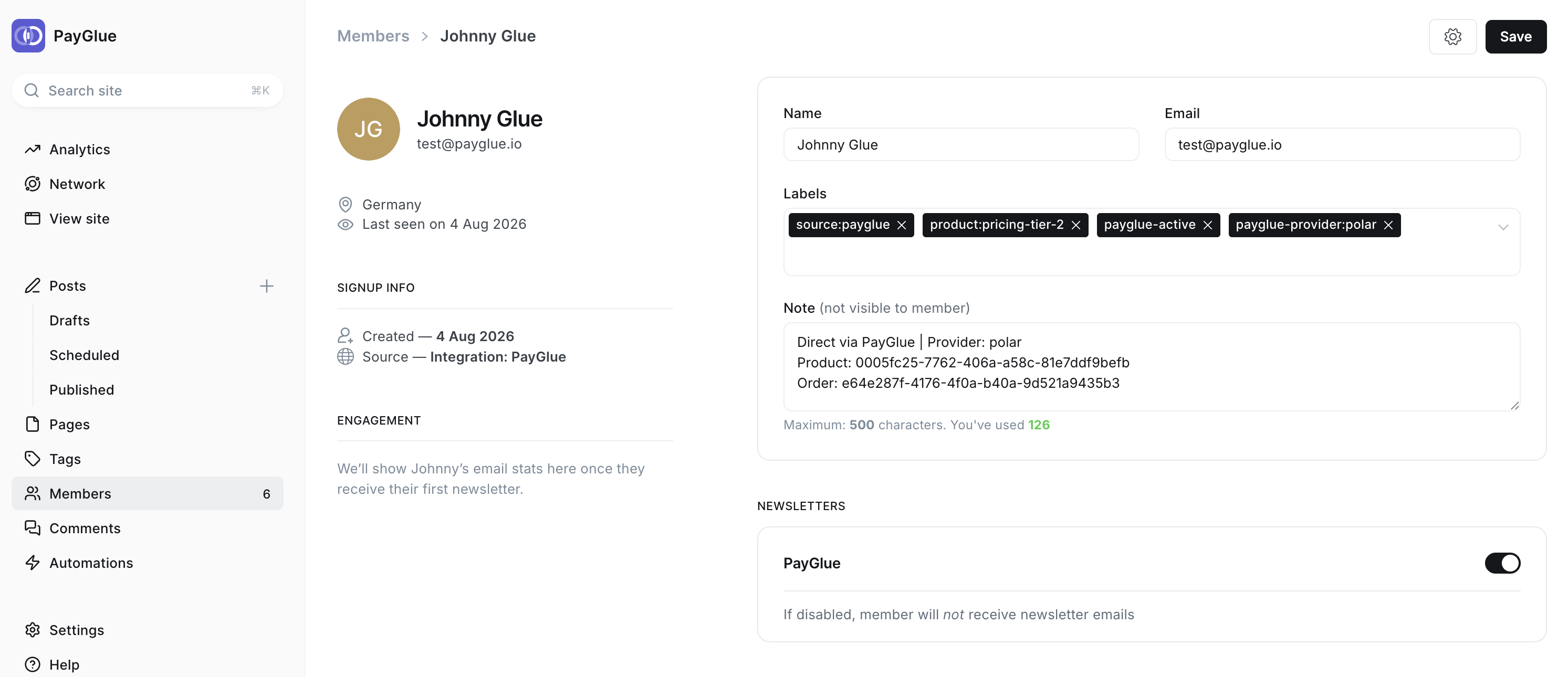
For comparison, this is what a member looks like when everything worked. Four labels, and a note naming the provider, the product and the order.
Cause one: no mapping for that product
This accounts for most of them.
A mapping is what connects a product at your provider to a tier in Ghost. Without one, the event arrives, gets verified, gets understood, and PayGlue has no instruction telling it what that particular purchase should grant. So it grants nothing.
The behaviour is correct, and the first time you meet it you will be certain it is a bug.
Two versions of this catch people:
Never mapped. You mapped one product while testing and added three more later without mapping them. The three new ones are inert.
Mapped a different product. You mapped prod_abc123 and the customer bought prod_abc124. Common if you duplicated a product to change a price, because a duplicate is a new product with a new ID and the mapping stayed on the original.
Open the event detail, read the product ID in the payload, and compare it to your mappings character by character. Do not eyeball it. These IDs are designed to be similar.
Cause two: the member exists under a different address
Worth checking before you conclude nothing was created, because it is the cause that wastes the most time when missed.
The Ghost member is keyed on the email address the payment carried. That is whatever the customer typed at your provider’s checkout, which is not necessarily the address they use for your site.
Someone signs up to your newsletter with a personal address, pays with a work card and lets the checkout prefill the work address, and now there are two people in Ghost as far as Ghost is concerned. One has the tier and never logs in. The other logs in and has nothing.
Search Ghost Admin for the address in the event payload rather than the address the customer emailed you from. If you find it, the integration worked perfectly and the problem is a human one. Merge or correct the record in Ghost.
There is no clever fix for this. Provider checkouts prefill addresses and customers do not read that field.
Cause three: the Ghost connection has gone stale
Less common, and unmistakable once you look.
The Admin API key is tied to a specific custom integration in Ghost. Delete that integration, regenerate its keys, or move the site to a new domain, and the key stops working. None of those events notify PayGlue.
Run the health check on the Ghost connection. It answers in a second, and green means Ghost is accepting the key against the URL you stored.
If it is red, go back to Settings, then Integrations in Ghost, confirm the PayGlue integration is still there, and re-enter the Admin API key and the site URL. Check the URL carefully after any domain change, including a move from a ghost.io subdomain to a custom domain.
One thing narrows this down fast: it fails for everyone at once. If a single member is missing and others have been created since, the connection is fine and the cause is one of the others.
Cause four: Ghost refused the call
Rare, and the event detail will tell you outright.
PayGlue records Ghost’s response to the API call. If Ghost rejected it, the reason is in the event detail rather than in Ghost’s logs, so read that before going anywhere else.
The two you might see: a tier named in the mapping that no longer exists in Ghost, usually after a rename, and a member the API declined to modify for a reason it states.
Rename a tier in Ghost and the mapping pointing at the old name is now pointing at nothing. Nothing in either system warns you at the moment you rename it.
The order matters
Working through these top to bottom takes about five minutes, and the reason for the order is that the cheap checks eliminate the expensive theories.
- Is the product mapped, and mapped to the ID that was actually bought?
- Does the member exist under the payment’s email address?
- Does the Ghost connection health check pass?
- What does the event detail say Ghost replied?
Most of the time you stop at one. Most of the remaining time you stop at two.
Afterwards
Once you have found it, grant the access by hand in Ghost Admin so the customer stops waiting. Then fix the cause, because the next purchase of that product will do exactly the same thing.
And when you have fixed it, buy the product yourself at a token amount and watch it work. A theory that a fix worked is not the same as having seen it work, and this is a cheap thing to be certain about.
Related: when the webhook never arrives at all, and what to test before you take real money.